Case Study: Zhongshan Land Subsidence Uncertainty
Context: Forecasting in Complex Urban Environments
Urban areas, particularly coastal and delta regions like Zhongshan in China’s Pearl River Delta, face significant challenges from land subsidence. This gradual sinking, driven by complex interactions between groundwater extraction, geological conditions, infrastructure load, and climate factors, poses risks to buildings, flood control, and sustainable development. Accurately forecasting future subsidence is crucial for effective urban planning and hazard mitigation, but requires not only predicting the most likely outcome but also understanding the associated predictive uncertainty (Liu et al.[1]).
This case study demonstrates how various visualization tools within the
k-diagram package can be applied to analyze and interpret the
outputs of a land subsidence forecasting model, using a sample dataset
derived from research focused on the Zhongshan area (Kouadio[2]).
We will explore how different polar plots help reveal patterns in uncertainty,
model performance, and potential prediction anomalies.
Note
The dataset used in this case study (min_zhongshan.csv, accessed
via load_zhongshan_subsidence()) is a
sample derived from larger research model outputs. It is
provided for educational and demonstration purposes only to
illustrate the use of k-diagram functions. It does not represent
the complete, validated forecast results for the region.
The Zhongshan Sample Dataset
The dataset included with k-diagram provides a snapshot of predicted subsidence uncertainty for 898 locations over multiple years.
Key Characteristics:
Spatial Coordinates: Includes
longitudeandlatitudefor each location.Target Values: Contains columns
subsidence_2022andsubsidence_2023representing reference or baseline subsidence values for those years (useful for some diagnostics like coverage).Quantile Forecasts: Provides predicted quantiles (Q10, Q50, Q90) for the years 2022 through 2026 (e.g.,
subsidence_2024_q0.1,subsidence_2024_q0.5,subsidence_2024_q0.9). This allows analysis of uncertainty intervals and their evolution over time.
Loading the Data:
You can easily load this data using the provided function. By default, it returns a Bunch object containing the DataFrame and useful metadata:
 1import kdiagram as kd
 2import warnings
 3
 4# Ignore potential download/cache warnings for brevity
 5warnings.filterwarnings("ignore", message=".*already exists.*")
 6
 7# Load data as Bunch (default)
 8try:
 9    zhongshan_data = kd.datasets.load_zhongshan_subsidence(
10        download_if_missing=True # Allow download if not found
11    )
12    print("Zhongshan data loaded successfully.")
13    print(f"DataFrame shape: {zhongshan_data.frame.shape}")
14    print("\nAvailable Columns (Sample):")
15    print(zhongshan_data.frame.columns[:10].tolist(), "...") # Show some columns
16    # print(zhongshan_data.DESCR) # Uncomment to see full description
17except FileNotFoundError:
18    print("Zhongshan dataset not found. Ensure k-diagram is installed"
19          " correctly with data, or check internet connection.")
Loading dataset from cache: ... or Loading dataset from installed package...
Zhongshan data loaded successfully.
DataFrame shape: (898, 19)

Available Columns (Sample):
['longitude', 'latitude', 'subsidence_2022', 'subsidence_2023', 'subsidence_2022_q0.1', 'subsidence_2022_q0.5', 'subsidence_2022_q0.9', 'subsidence_2023_q0.1', 'subsidence_2023_q0.5', 'subsidence_2023_q0.9'] ...
Analysis Examples using k-diagram
The following sections demonstrate how different k-diagram plots can be used with the Zhongshan dataset sample to analyze various aspects of the forecast uncertainty and model behavior.
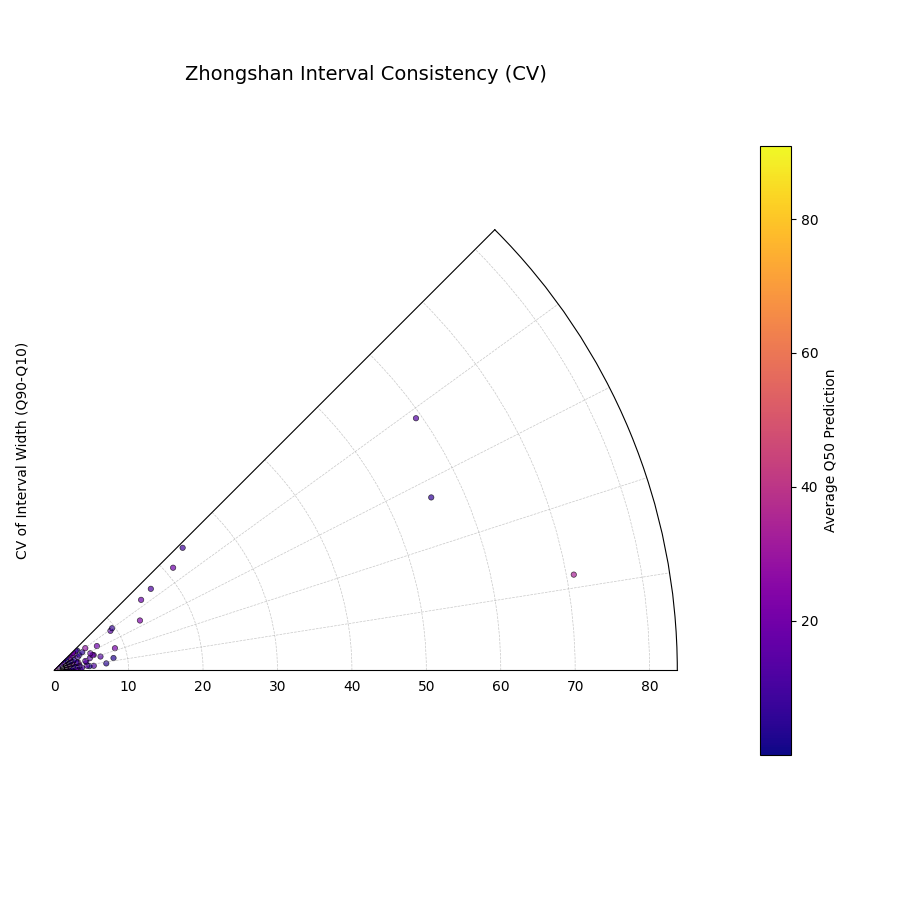
Loading Zhongshan Data for Interval Consistency Plot
This example demonstrates loading the packaged Zhongshan dataset using
load_zhongshan_subsidence() (as a Bunch object)
and analyzing the temporal consistency of its prediction interval widths
using plot_interval_consistency(). Includes
basic error handling in case the data cannot be loaded.
 1import kdiagram as kd
 2import matplotlib.pyplot as plt
 3import warnings
 4import pandas as pd # Used by the function internally
 5
 6# Suppress potential download warnings if data exists locally
 7warnings.filterwarnings("ignore", message=".*already exists.*")
 8
 9ax = None # Initialize ax
10try:
11    # 1. Load data as Bunch, allow download if missing
12    data = kd.datasets.load_zhongshan_subsidence(
13        as_frame=False,
14        download_if_missing=True,
15    )
16
17    # 2. Check if data loaded and has necessary columns
18    if (data is not None and hasattr(data, 'frame')
19            and data.q10_cols and data.q50_cols and data.q90_cols):
20
21        print(f"Loaded Zhongshan data with {len(data.frame)} samples.")
22        print(f"Plotting consistency for {len(data.q10_cols)} periods.")
23
24        # 3. Create the Interval Consistency plot
25        ax = kd.plot_interval_consistency(
26            df=data.frame,
27            qlow_cols=data.q10_cols,
28            qup_cols=data.q90_cols,
29            q50_cols=data.q50_cols, # Use Q50 for color context
30            use_cv=True,           # Use Coefficient of Variation
31            title="Zhongshan Interval Consistency (CV)",
32            cmap='plasma',
33            s=15, alpha=0.7,
34            acov='eighth_circle',
35            mask_angle=True,
36            # Save the plot
37            savefig="../images/dataset_plot_example_zhongshan_consistency.png"
38        )
39        plt.close() # Close plot after saving
40    else:
41        print("Loaded data object missing required attributes (frame/cols).")
42
43except FileNotFoundError as e:
44    print(f"ERROR - Zhongshan data not found: {e}")
45except Exception as e:
46    print(f"An unexpected error occurred during plotting: {e}")
47
48if ax is None:
49    print("Plot generation skipped due to data loading issues.")
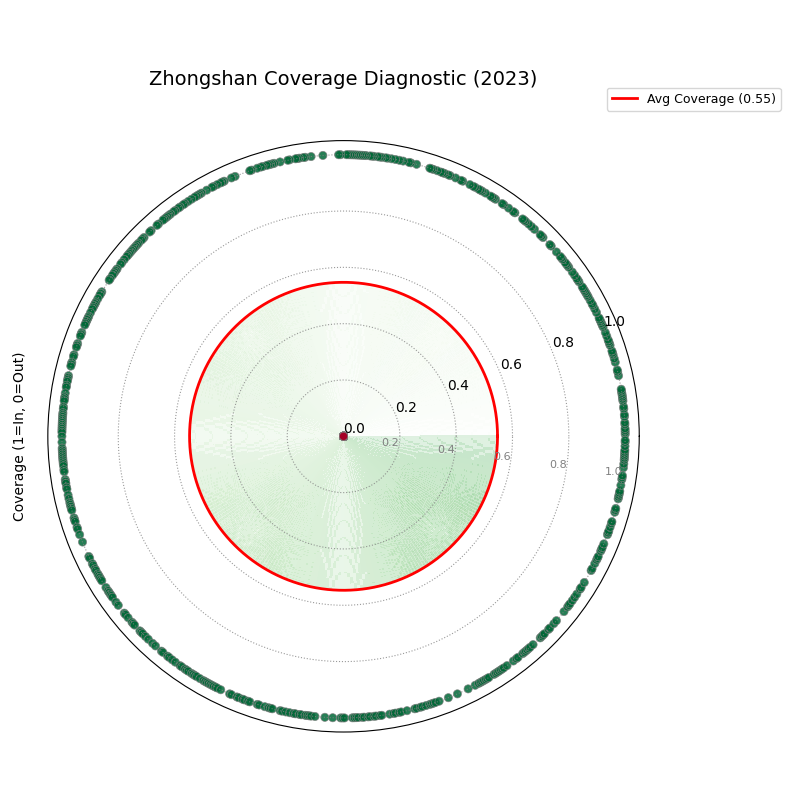
Loading Zhongshan Data for Coverage Diagnostic (Specific Year)
This example loads the Zhongshan dataset, subsets it to a specific
year (2023) and relevant quantiles (Q10, Q90) during the load step,
and then uses plot_coverage_diagnostic()
to visualize point-wise coverage for that year.
 1import kdiagram as kd
 2import matplotlib.pyplot as plt
 3import warnings
 4import pandas as pd
 5
 6# Suppress potential download warnings
 7warnings.filterwarnings("ignore", message=".*already exists.*")
 8
 9ax = None
10try:
11    # 1. Load data as Bunch, selecting only 2023 data and Q10/Q90
12    # Also ensure the target column for 2023 is included.
13    # Note: Target column name is 'subsidence_2023' in this dataset.
14    data = kd.datasets.load_zhongshan_subsidence(
15        as_frame=False,
16        years=[2023],            # Select only year 2023
17        quantiles=[0.1, 0.9],    # Select only Q10 and Q90
18        include_target=True,     # Ensure target column is kept
19        download_if_missing=True
20    )
21
22    # 2. Check data and identify columns for plotting
23    actual_col = 'subsidence_2023' # Known target column for 2023
24    q_cols_plot = []
25    if data is not None and actual_col in data.frame.columns:
26         if data.q10_cols: q_cols_plot.append(data.q10_cols[0])
27         if data.q90_cols: q_cols_plot.append(data.q90_cols[0])
28
29    if len(q_cols_plot) == 2:
30        print(f"Loaded Zhongshan data for {actual_col}.")
31        print(f"Plotting coverage diagnostic using: {q_cols_plot}")
32
33        # 3. Create the Coverage Diagnostic plot
34        ax = kd.plot_coverage_diagnostic(
35            df=data.frame,
36            actual_col=actual_col,
37            q_cols=q_cols_plot, # Should contain 2023 Q10 & Q90 cols
38            title="Zhongshan Coverage Diagnostic (2023)",
39            as_bars=False, # Use scatter points
40            fill_gradient=True,
41            verbose=1, # Print overall coverage rate
42            # Save the plot
43            savefig="../images/dataset_plot_example_zhongshan_coverage.png"
44        )
45        plt.close()
46    else:
47         print("Required columns ('subsidence_2023', Q10, Q90) "
48               "not found in loaded data.")
49
50except FileNotFoundError as e:
51    print(f"ERROR - Zhongshan data not found: {e}")
52except Exception as e:
53    print(f"An unexpected error occurred: {e}")
54
55if ax is None:
56    print("Plot generation skipped.")
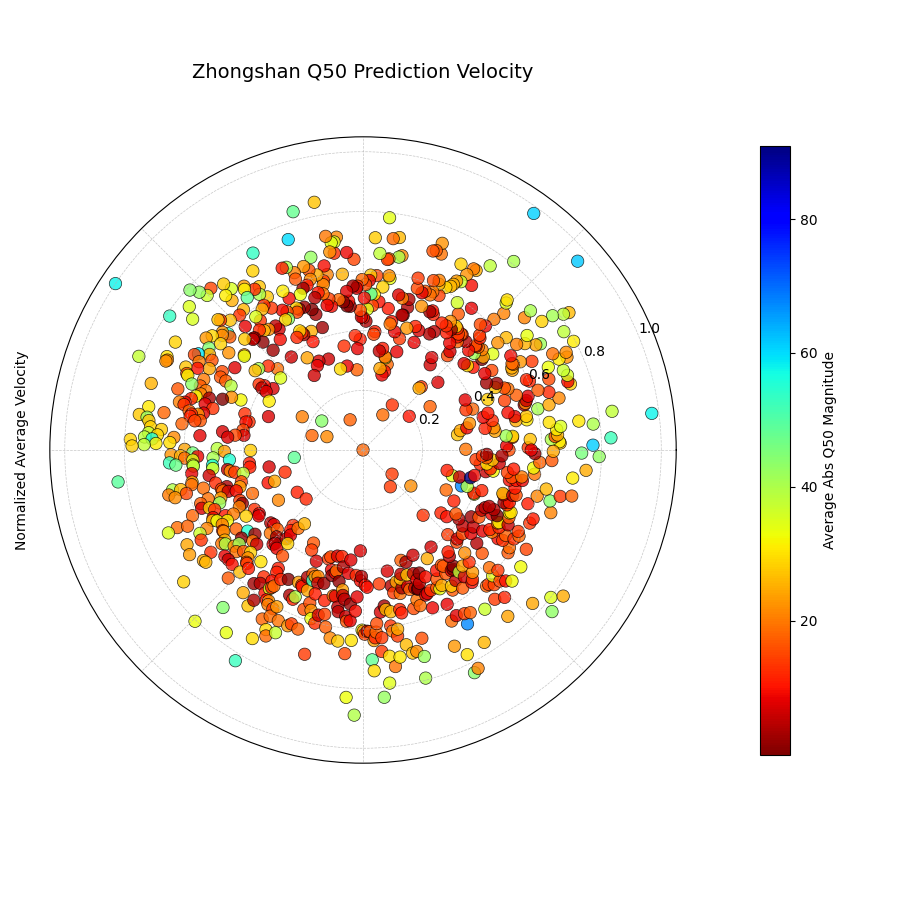
Zhongshan Data: Velocity Plot (Default Coverage)
Load Zhongshan data (as Bunch) and visualize the average velocity of the median (Q50) predictions using the full 360-degree view (acov=’default’). Color represents the average Q50 magnitude.
 1import kdiagram as kd
 2import matplotlib.pyplot as plt
 3import warnings
 4import pandas as pd
 5
 6warnings.filterwarnings("ignore", message=".*already exists.*")
 7ax = None
 8try:
 9    # 1. Load data as Bunch
10    data = kd.datasets.load_zhongshan_subsidence(
11        as_frame=False, download_if_missing=True
12        )
13
14    # 2. Check data
15    if data is not None and data.q50_cols:
16        print(f"Loaded Zhongshan data with {len(data.frame)} samples.")
17        print(f"Plotting velocity using {len(data.q50_cols)} periods.")
18
19        # 3. Create the Velocity plot
20        ax = kd.plot_velocity(
21            df=data.frame,
22            q50_cols=data.q50_cols,
23            title="Zhongshan Q50 Prediction Velocity",
24            acov='default',       # Full circle coverage
25            use_abs_color=True,   # Color by Q50 magnitude
26            normalize=True,       # Normalize radius
27            cmap='jet_r',
28            cbar=True, s=80, alpha=0.8,
29            mask_angle=True,
30            # Save the plot
31            savefig="../images/dataset_plot_example_zhongshan_velocity.png"
32        )
33        plt.close()
34    else:
35        print("Loaded data object missing required attributes.")
36
37except FileNotFoundError as e:
38    print(f"ERROR - Zhongshan data not found: {e}")
39except Exception as e:
40    print(f"An unexpected error occurred: {e}")
41
42if ax is None: print("Plot generation skipped.")
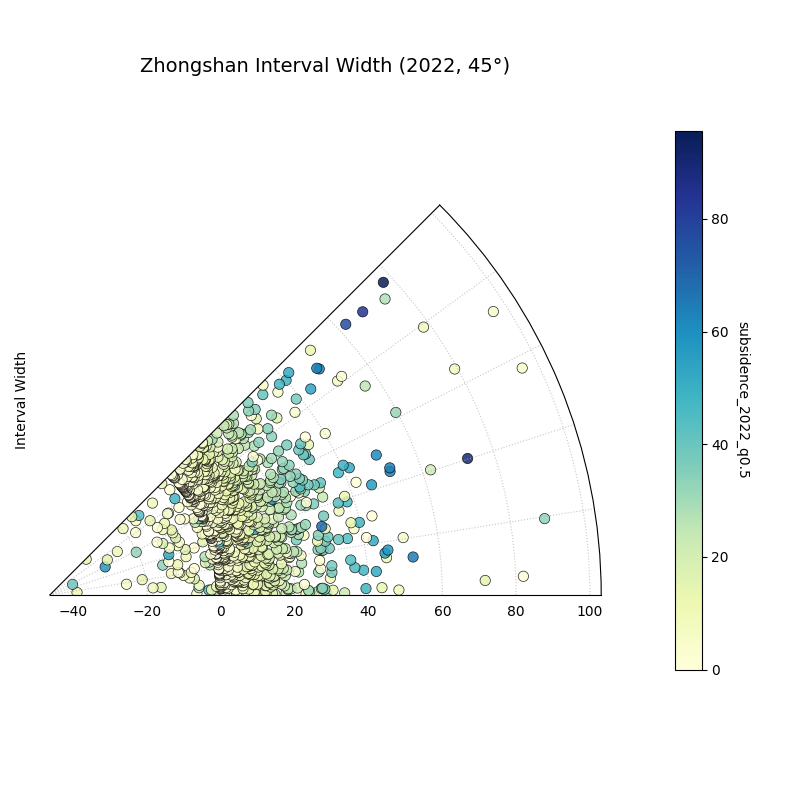
Zhongshan Data: Interval Width Plot (2022, Eighth Circle)
Load Zhongshan data, select the Q10, Q50, and Q90 columns for the
first available year (assumed 2022), and plot the interval width
using plot_interval_width() with
Q50 for color, restricted to a 45-degree view (acov=’eighth_circle’).
 1import kdiagram as kd
 2import matplotlib.pyplot as plt
 3import warnings
 4import pandas as pd
 5
 6warnings.filterwarnings("ignore", message=".*already exists.*")
 7ax = None
 8try:
 9    # 1. Load data as Bunch
10    data = kd.datasets.load_zhongshan_subsidence(
11        as_frame=False, download_if_missing=True
12        )
13
14    # 2. Check data and extract columns for the first year (e.g., 2022)
15    if (data is not None and hasattr(data, 'frame')
16            and data.q10_cols and data.q50_cols and data.q90_cols):
17
18        q10_col_first = data.q10_cols[0] # Assumes list is ordered
19        q50_col_first = data.q50_cols[0]
20        q90_col_first = data.q90_cols[0]
21        year_first = str(data.start_year) # Assumes start_year attr exists
22
23        print(f"Plotting interval width for Zhongshan, year {year_first}")
24
25        # 3. Create the Interval Width plot
26        ax = kd.plot_interval_width(
27            df=data.frame,
28            q_cols=[q10_col_first, q90_col_first], # Q10, Q90 for one year
29            z_col=q50_col_first,       # Color by Q50 of that year
30            acov='eighth_circle',      # <<< Use 45 degree view
31            title=f"Zhongshan Interval Width ({year_first}, 45°)",
32            cmap='YlGnBu',
33            cbar=True, s=55, alpha=0.85, mask_angle=True,
34            # Save the plot
35            savefig="../images/dataset_plot_example_zhongshan_width_45deg.png"
36        )
37        plt.close()
38    else:
39        print("Loaded data object missing required attributes.")
40
41except FileNotFoundError as e:
42    print(f"ERROR - Zhongshan data not found: {e}")
43except Exception as e:
44    print(f"An unexpected error occurred: {e}")
45
46if ax is None: print("Plot generation skipped.")
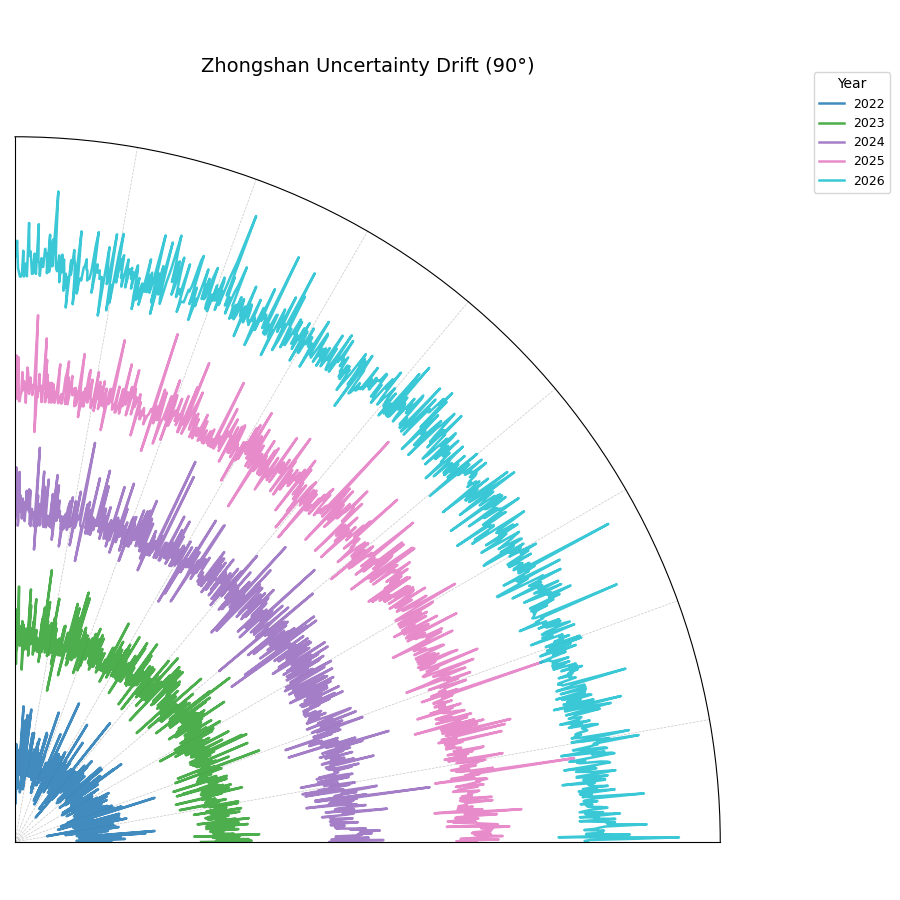
Zhongshan Data: Uncertainty Drift Plot (Quarter Circle)
Load Zhongshan data (as Bunch) and visualize the temporal drift of
uncertainty patterns using concentric rings with
plot_uncertainty_drift(), restricted
to a 90-degree view (acov=’quarter_circle’).
 1import kdiagram as kd
 2import matplotlib.pyplot as plt
 3import warnings
 4import pandas as pd
 5
 6warnings.filterwarnings("ignore", message=".*already exists.*")
 7ax = None
 8try:
 9    # 1. Load data as Bunch
10    data = kd.datasets.load_zhongshan_subsidence(
11        as_frame=False, download_if_missing=True
12        )
13
14    # 2. Check data and prepare labels
15    if (data is not None and hasattr(data, 'frame')
16            and data.q10_cols and data.q90_cols
17            and hasattr(data, 'start_year') and hasattr(data, 'n_periods')):
18
19        horizons = [str(data.start_year + i) for i in range(data.n_periods)]
20        print(f"Plotting uncertainty drift for Zhongshan: {horizons}")
21
22        # 3. Create the Uncertainty Drift plot
23        ax = kd.plot_uncertainty_drift(
24            df=data.frame,
25            qlow_cols=data.q10_cols,
26            qup_cols=data.q90_cols,
27            dt_labels=horizons,
28            acov='quarter_circle', # <<< Use 90 degree view
29            title="Zhongshan Uncertainty Drift (90°)",
30            cmap='viridis',
31            show_legend=True, mask_angle=True,
32            # Save the plot
33            savefig="../images/dataset_plot_example_zhongshan_uncertainty_drift.png"
34        )
35        plt.close()
36    else:
37        print("Loaded data object missing required attributes.")
38
39except FileNotFoundError as e:
40    print(f"ERROR - Zhongshan data not found: {e}")
41except Exception as e:
42    print(f"An unexpected error occurred: {e}")
43
44if ax is None: print("Plot generation skipped.")
See also
The forecasting challenges and visualization techniques discussed in relation to the Zhongshan case study are further detailed in related research publications.
For details on how to cite the k-diagram software and these specific papers (including submissions to Nature Communications and the International Journal of Forecasting), please refer to the Citing k-diagram page.
References