Relationship Visualization
This gallery page showcases plots from the relationship module,
which provide unique polar perspectives on the relationships between
the core components of a forecast: true values, model
predictions, and forecast errors.
These diagnostic plots are designed to reveal complex patterns such as conditional biases, heteroscedasticity, and non-linear correlations that are often difficult to see in standard Cartesian plots. This module is expected to expand with more specialized relationship diagnostics in the future.
Note
You need to run the code snippets locally to generate the plot
images referenced below. Ensure the image paths in the
.. image:: directives match where you save the plots.
True vs. Predicted Relationship
The plot_relationship() function offers
a novel way to visualize the correlation between true values and model
predictions, moving beyond a standard Cartesian scatter plot. By mapping
the true values to the angular axis and the normalized predicted values
to the radial axis, it creates a spiral-like plot that reveals the
consistency and correlation of model predictions across the entire data
range.
First, let’s break down the components of this powerful comparative plot.
Plot Anatomy
Angle (θ): The angular position is directly proportional to the true value (
y_true) when using the defaulttheta_scale= 'proportional'. The plot spirals outwards as the true value increases, mapping the full range of true values onto the chosen angular coverage.Radius (r): The radial distance corresponds to the normalized predicted value. Each prediction series is scaled independently to the range [0, 1]. A radius of 1 means the prediction was the maximum value for that specific model, while a radius of 0 was its minimum.
Color: Each prediction series (
y_preds) is assigned a distinct color, allowing for the direct comparison of multiple models on the same plot.
With this framework, let’s apply the plot to a real-world problem, progressing from a basic model comparison to a more advanced diagnostic.
Use Case 1: Comparing Linear vs. Non-Linear Model Behavior
The most direct use of this plot is to compare the fundamental response patterns of different models. Does a model’s prediction increase linearly with the true value, or does it exhibit more complex, non-linear behavior?
Let’s simulate a scenario where an environmental agency is comparing a simple linear model and a more complex non-linear model for predicting river temperature.
 1import kdiagram as kd
 2import numpy as np
 3import matplotlib.pyplot as plt
 4
 5# --- 1. Data Generation: River Temperature Models ---
 6np.random.seed(1)
 7n_points = 150
 8y_true = np.linspace(5, 25, n_points) # True water temperatures
 9# Model A: A simple linear response
10y_pred_A = y_true + np.random.normal(0, 1.5, n_points)
11# Model B: A non-linear model that levels off at high temperatures
12y_pred_B = 25 - 20 * np.exp(-0.2 * y_true) + np.random.normal(0, 1.5, n_points)
13
14# --- 2. Plotting ---
15kd.plot_relationship(
16    y_true,
17    y_pred_A,
18    y_pred_B,
19    names=["Model A (Linear)", "Model B (Non-Linear)"],
20    title="Use Case 1: River Temperature Model Responses",
21    acov="default", # Use a full circle
22    s=40,
23    savefig="gallery/images/gallery_plot_relationship_basic.png"
24)
25plt.close()
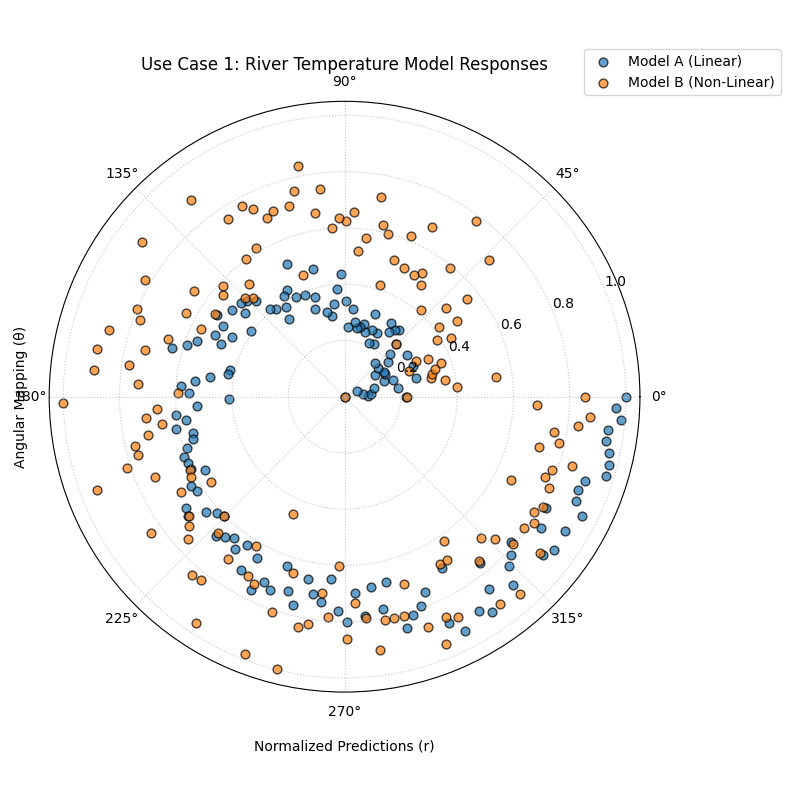
Two spirals of points, where the blue spiral (Linear Model) is tight and uniform, while the orange spiral (Non-Linear Model) is more dispersed and shows a different shape.
Use Case 2: Using Custom Angular Labels for Better Context
While mapping the angle to the true value is the default, the true value
itself might not be the most intuitive label for the angular axis. For
time series data, we often want to label the angle with the date or month.
The z_values and z_label parameters are designed for exactly this.
Let’s analyze a 12-month forecast for a company’s monthly recurring revenue (MRR). We will map the true MRR to the angle for positioning, but we will label the angle with the month to make the plot easier to read.
 1# --- 1. Data Generation: Monthly Revenue Forecast ---
 2np.random.seed(42)
 3n_months = 12 * 5 # 5 years of monthly data
 4time_index = np.arange(n_months)
 5# A signal with growth and yearly seasonality
 6y_true_mrr = 100 + time_index * 2 + 20 * np.sin(time_index * 2 * np.pi / 12) + np.random.normal(0, 5, n_months)
 7y_pred_mrr = y_true_mrr + np.random.normal(0, 8, n_months)
 8# Our custom labels for the angular axis
 9month_labels = (time_index % 12) + 1
10
11# --- 2. Plotting with Custom z_values ---
12kd.plot_relationship(
13    y_true_mrr,
14    y_pred_mrr,
15    names=["MRR Forecast"],
16    title="Use Case 2: Revenue Forecast with Monthly Labels",
17    acov="default",
18    z_values=month_labels, # Provide the month numbers as labels
19    z_label="Month of Year",
20    s=30,
21    savefig="gallery/images/gallery_plot_relationship_z_values.png"
22)
23plt.close()
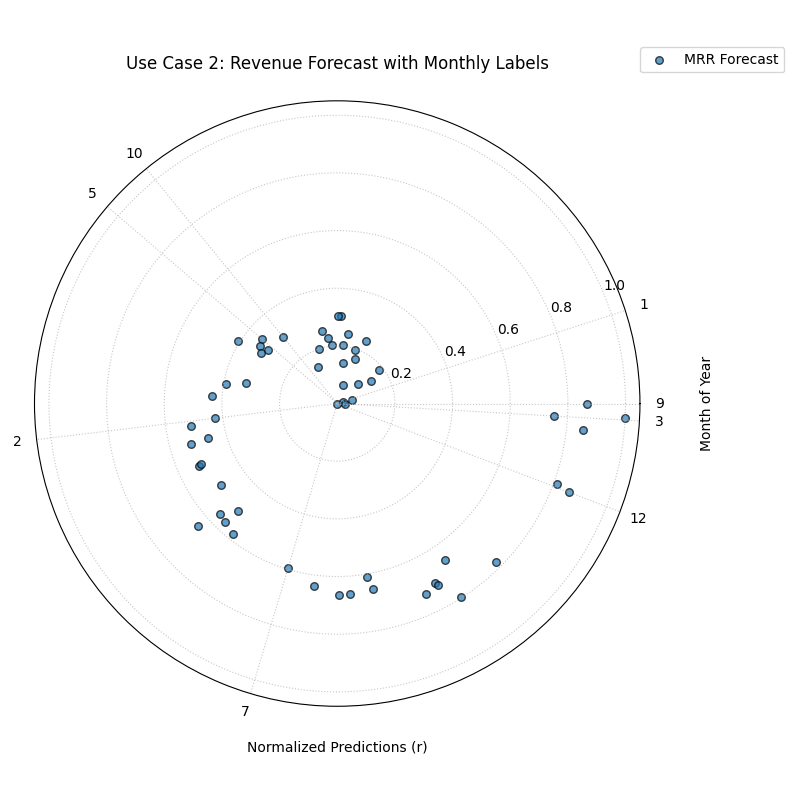
A spiral of points where the angular ticks are labeled with the month of the year (1-12) instead of the raw true value.
Best Practice
For time series or other sequentially ordered data, using z_values
to label the angular axis with a time-based unit (like month, day, or
hour) can make the plot vastly more intuitive and easier to interpret,
providing richer context than the raw true values alone.
For a deeper understanding of the mathematical concepts behind the coordinate mapping and normalization, please refer back to the main True vs. Predicted Polar Relationship (plot_relationship()) section.
Conditional Quantile Bands
The plot_conditional_quantiles()
function is a diagnostic for visualizing the conditional
behavior of a probabilistic forecast. It answers the question: “How
does my model’s entire predicted distribution, including its central
tendency and uncertainty, change as a function of the true observed
value?” It is the primary tool for visually diagnosing
heteroscedasticity.
First, let’s break down the components of this detailed diagnostic plot.
Plot Anatomy
Angle (θ): Represents the true observed value (\(y_{true}\)), sorted and mapped to the angular axis. The plot spirals outwards from the lowest true value to the highest.
Radius (r): Represents the magnitude of the predicted value for each quantile.
Central Line: The solid black line shows the median (Q50) forecast. Its spiral should ideally track the true value spiral (if it were plotted).
Shaded Bands: Each shaded band represents a prediction interval (e.g., the 80% interval between Q10 and Q90). The width of these bands at any given angle visualizes the model’s predicted uncertainty for that specific true value.
Now, let’s apply this plot to a real-world problem where understanding conditional uncertainty is critical.
Use Case 1: Diagnosing Heteroscedasticity in Financial Forecasting
A core challenge in financial modeling is that volatility is not constant. A stock’s price may be stable and predictable during calm periods but highly volatile and uncertain during market turmoil. A good probabilistic model must capture this changing uncertainty.
Let’s simulate a forecast for an asset’s price, where the true volatility (and thus the model’s predictive uncertainty) increases as the asset’s price increases.
 1import kdiagram as kd
 2import numpy as np
 3import matplotlib.pyplot as plt
 4
 5# --- 1. Data Generation: A forecast with heteroscedastic uncertainty ---
 6np.random.seed(0)
 7n_samples = 300
 8# True asset price, sorted to create a smooth spiral
 9y_true = np.linspace(50, 500, n_samples)
10quantiles = np.array([0.1, 0.25, 0.5, 0.75, 0.9]) # For 80% and 50% intervals
11
12# Key: Uncertainty (interval width) increases with the true value
13error_std = 5 + (y_true / 500) * 40
14# Generate quantile predictions based on this changing standard deviation
15y_preds = np.zeros((n_samples, len(quantiles)))
16y_preds[:, 2] = y_true + np.random.normal(0, 5, n_samples) # Median forecast
17z_scores = np.array([-1.28, -0.67, 0, 0.67, 1.28]) # For 10,25,50,75,90
18for i, z in enumerate(z_scores):
19    y_preds[:, i] = y_preds[:, 2] + z * error_std
20
21# --- 2. Plotting ---
22kd.plot_conditional_quantiles(
23    y_true, y_preds, quantiles,
24    bands=[80, 50], # Show 80% and 50% intervals
25    title="Use Case 1: Diagnosing Heteroscedasticity",
26    savefig="gallery/images/gallery_conditional_quantiles_hetero.png"
27)
28plt.close()
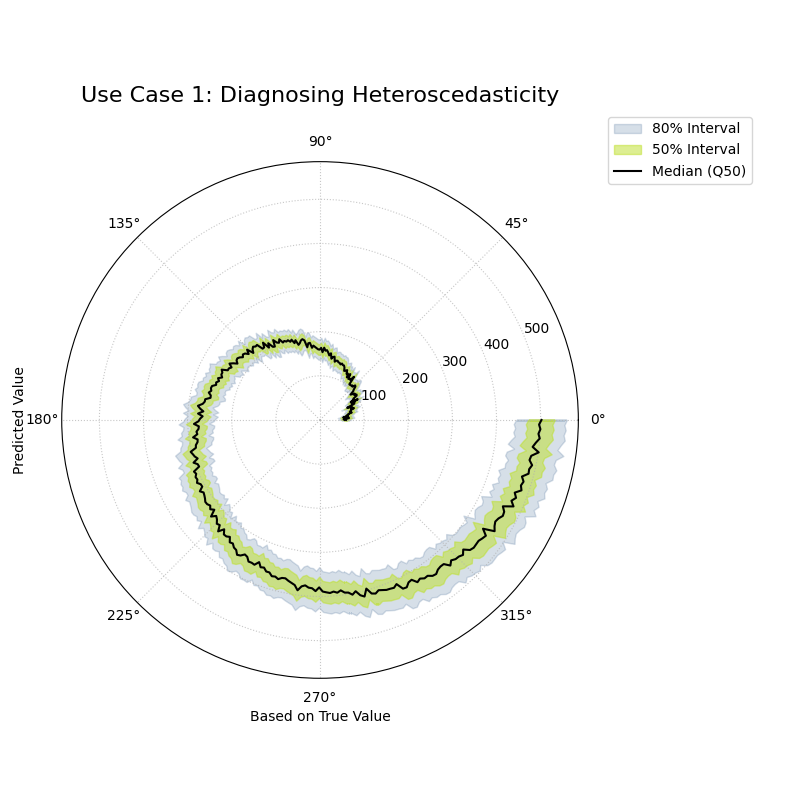
A spiral of quantile bands where the width of the bands clearly increases as the radius and angle increase, showing heteroscedasticity.
Use Case 2: Identifying a Homoscedastic (Naive) Model
To better appreciate a good heteroscedastic model, it’s useful to see what a naive, homoscedastic model looks like. This type of model incorrectly assumes that the level of uncertainty is constant, regardless of the situation.
Let’s create a forecast from a simpler model that uses a “one-size-fits-all” approach to uncertainty for the same financial asset.
 1# --- 1. Data Generation (uses y_true and quantiles from previous step) ---
 2# This model uses a constant, average uncertainty for all predictions
 3constant_error_std = 20.0
 4y_preds_homo = np.zeros((n_samples, len(quantiles)))
 5y_preds_homo[:, 2] = y_true + np.random.normal(0, 5, n_samples)
 6for i, z in enumerate(z_scores):
 7    y_preds_homo[:, i] = y_preds_homo[:, 2] + z * constant_error_std
 8
 9# --- 2. Plotting ---
10kd.plot_conditional_quantiles(
11    y_true, y_preds_homo, quantiles,
12    bands=[80, 50],
13    cmap='magma',
14    title="Use Case 2: A Naive (Homoscedastic) Forecast",
15    savefig="gallery/images/gallery_conditional_quantiles_homo.png"
16)
17plt.close()
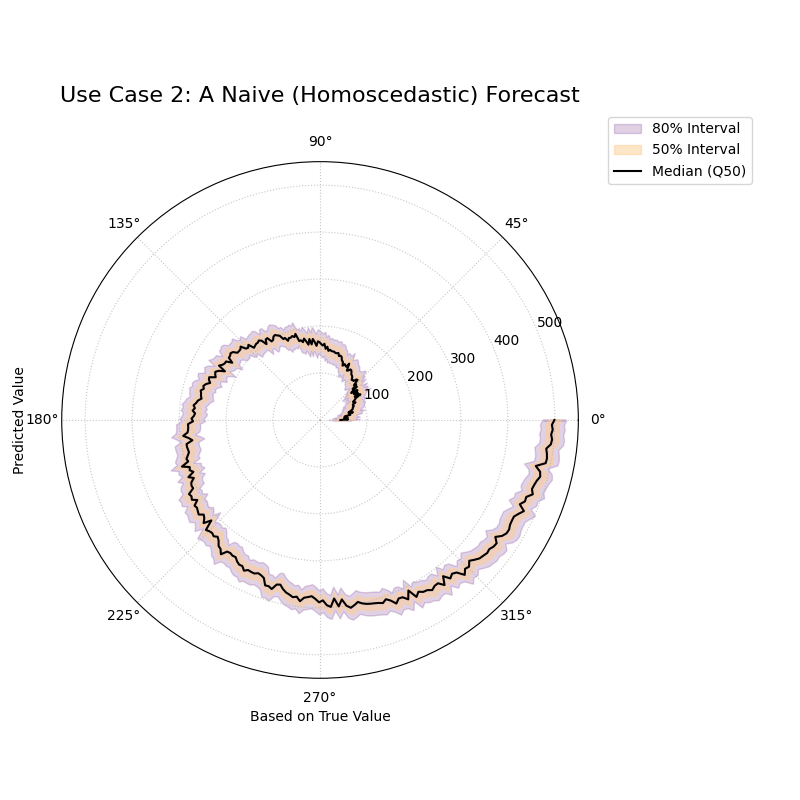
A spiral of quantile bands where the width of the shaded area remains constant from the center to the edge.
See Also
The plot_credibility_bands()
function provides a related but different view. While this plot shows
how uncertainty changes with the true value, plot_credibility_bands
(section Polar Credibility Bands) shows how the average
uncertainty changes with a third, categorical feature
(like the month of the year).
For a deeper understanding of the statistical concepts behind conditional distributions and heteroscedasticity, please refer back to the main Conditional Quantile Bands (plot_conditional_quantiles()) and section.
Error vs. True Value Relationship
The plot_error_relationship() function
is a tool for going beyond simple error metrics and
understanding the structure of a model’s errors. By plotting the
forecast error against the true observed value, it helps answer a
critical question: “Are my model’s errors correlated with the magnitude
of the actual outcome?” Uncovering such a correlation is key to diagnosing
conditional biases and other hidden flaws.
First, let’s break down the components of this diagnostic plot.
Plot Anatomy
Angle (θ): Represents the true value (\(y_{true}\)), sorted and mapped to the angular axis. The plot spirals outwards as the true value increases. The angular labels are often hidden (
mask_angle=True) as the progression is the key insight, not the specific values.Radius (r): Represents the forecast error or residual (\(e = y_{true} - y_{pred}\)). To handle positive and negative errors, the plot is shifted so that the radius represents the error relative to a “Zero Error” circle.
Zero Error Circle: The dashed black circle is the crucial reference. Points falling on this line had a perfect prediction (error = 0). Points outside the circle are under-predictions (positive error), while points inside are over-predictions (negative error).
Now, let’s apply this diagnostic to a real-world problem to see how it can reveal different types of model deficiencies.
Use Case 1: Diagnosing a Conditional Bias
A common failure mode for regression models is a conditional bias, where the model is accurate for a certain range of values but becomes systematically biased for another.
Let’s simulate a model for predicting house prices that performs well on cheaper houses but consistently under-predicts the price of expensive luxury homes.
 1import kdiagram as kd
 2import numpy as np
 3import matplotlib.pyplot as plt
 4
 5# --- 1. Data Generation: A model with conditional bias ---
 6np.random.seed(0)
 7n_samples = 250
 8# A skewed distribution of true house prices
 9y_true = np.random.lognormal(mean=12.5, sigma=0.5, size=n_samples)
10# The model's error is proportional to the true value, causing under-prediction for high values
11bias = y_true * 0.15
12y_pred = y_true - bias + np.random.normal(0, 0.05 * y_true.max(), n_samples)
13
14# --- 2. Plotting ---
15kd.plot_error_relationship(
16    y_true, y_pred,
17    names=["House Price Model"],
18    title="Use Case 1: Error vs. True Value (Conditional Bias)",
19    s=40,
20    mask_angle=True,
21    savefig="gallery/images/gallery_error_relationship_bias.png"
22)
23plt.close()
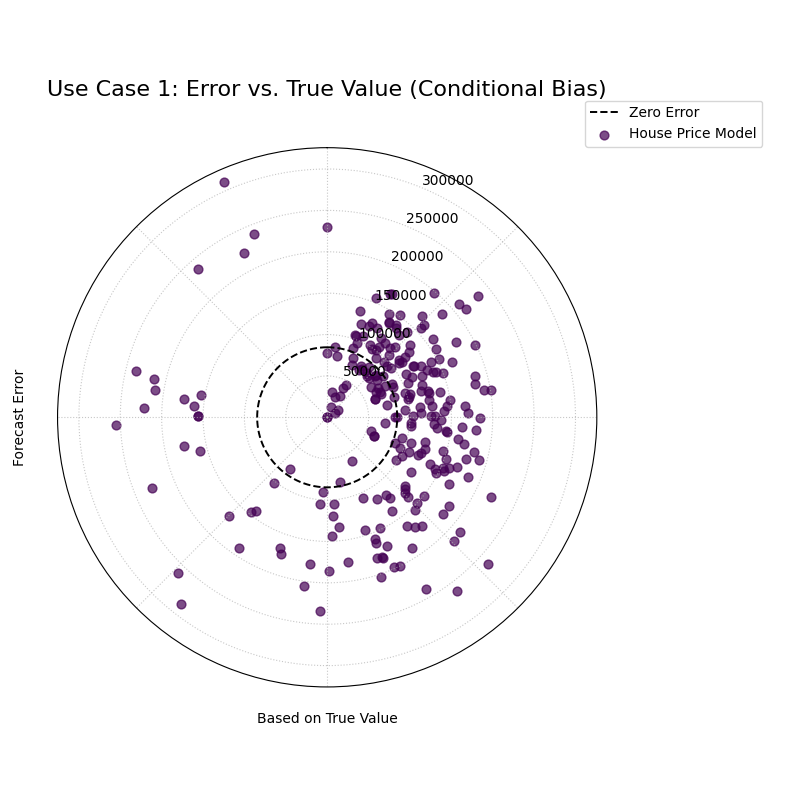
A spiral of error points that are centered on the zero-error line at small angles but drift progressively outwards at larger angles.
Use Case 2: Diagnosing Heteroscedasticity
Another common issue is heteroscedasticity, where the variance of the model’s errors changes with the true value. The model might be very consistent for one range of outcomes but become erratic and unpredictable for another.
Let’s simulate a scientific instrument that is very precise when measuring small quantities but becomes much noisier and less reliable when measuring large quantities.
 1# --- 1. Data Generation: A model with heteroscedastic error ---
 2np.random.seed(42)
 3n_samples = 250
 4y_true_measurement = np.linspace(1, 100, n_samples)
 5# The standard deviation of the error increases with the true value
 6error_variance = y_true_measurement * 0.1
 7y_pred_measurement = y_true_measurement + np.random.normal(0, error_variance, n_samples)
 8
 9# --- 2. Plotting ---
10kd.plot_error_relationship(
11    y_true_measurement, y_pred_measurement,
12    names=["Instrument Model"],
13    title="Use Case 2: Error vs. True Value (Heteroscedasticity)",
14    s=40,
15    savefig="gallery/images/gallery_error_relationship_hetero.png"
16)
17plt.close()
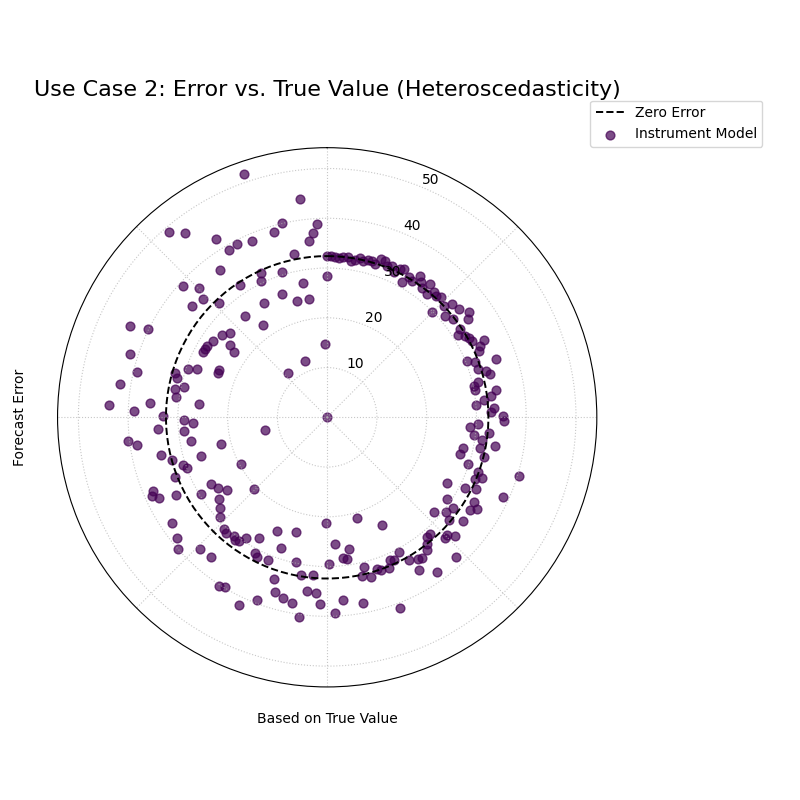
A spiral of error points that is very narrow at small angles but becomes progressively wider and more spread out at larger angles, forming a cone shape.
See Also
This plot is the direct companion to the
plot_residual_relationship() function.
This current plot answers - “Are my errors related to the **actual outcome*?”,
while the ``plot_residual_relationship`` answers - *”Are my errors related
to what my **model is predicting*?”*
Both are crucial for a complete diagnosis of model residuals.
For a deeper understanding of the statistical concepts behind conditional bias and heteroscedasticity, please refer back to the main Error vs. True Value Relationship (plot_error_relationship()) section.
Residual vs. Predicted Relationship
The plot_residual_relationship()
function provides a polar version of the classic residual plot, a
fundamental diagnostic for any regression model. It is designed to
answer the question: “Are my model’s errors correlated with its own
predictions?” Uncovering such a pattern is key to diagnosing issues like
heteroscedasticity and ensuring the model’s reliability across its full
range of outputs.
First, let’s break down the components of this essential diagnostic plot.
Plot Anatomy
Angle (θ): Represents the predicted value (\(y_{pred}\)), sorted and mapped to the angular axis. The plot spirals outwards as the predicted value increases.
Radius (r): Represents the forecast error or residual (\(e = y_{true} - y_{pred}\)). The plot is shifted so that the radius represents the error relative to the “Zero Error” circle.
Zero Error Circle: The dashed black circle is the reference line for a perfect prediction. Points outside the circle are under-predictions, while points inside are over-predictions.
Now, let’s apply this diagnostic to a real-world problem to see how it can reveal common model flaws.
Use Case 1: Diagnosing Heteroscedasticity
The most critical use of this plot is to check for heteroscedasticity, a condition where the variance of a model’s errors is not constant. A robust model should have errors that are equally spread out, regardless of the magnitude of its prediction.
Let’s simulate a model for predicting house prices that becomes more erratic and less reliable when it predicts higher prices.
 1import kdiagram as kd
 2import numpy as np
 3import matplotlib.pyplot as plt
 4
 5# --- 1. Data Generation: A model with heteroscedastic errors ---
 6np.random.seed(42)
 7n_samples = 250
 8# A range of predicted house prices
 9y_pred = np.linspace(200000, 2500000, n_samples)
10# Key: The error's standard deviation increases with the predicted price
11error_variance = (y_pred / y_pred.max()) * 150000
12errors = np.random.normal(0, error_variance, n_samples)
13y_true = y_pred + errors
14
15# --- 2. Plotting ---
16kd.plot_residual_relationship(
17    y_true, y_pred,
18    names=["House Price Model"],
19    title="Use Case 1: Diagnosing Heteroscedasticity",
20    s=40,
21    alpha=0.6,
22    savefig="gallery/images/gallery_residual_relationship_hetero.png"
23)
24plt.close()
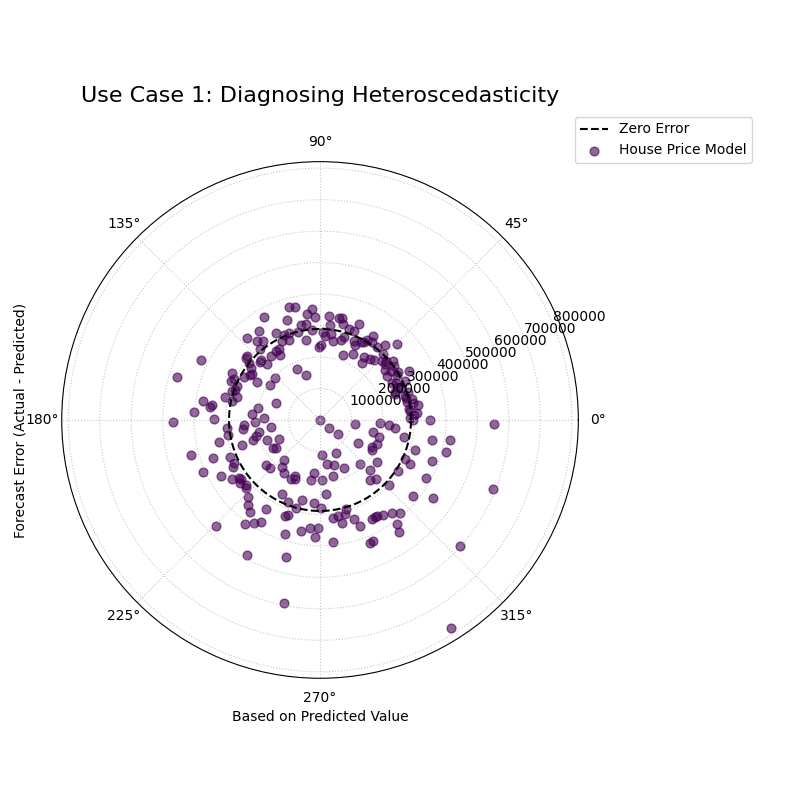
A spiral of error points that is very narrow for low predicted values but becomes progressively wider at higher predicted values, forming a distinct cone or fan shape.
Use Case 2: Identifying a Well-Behaved Model
To appreciate a flawed model, it helps to see what a good one looks like. A well-behaved model should produce residuals that are randomly and uniformly scattered around the zero-error line, forming a spiral of constant width.
Let’s simulate a second, improved house price model that has overcome the heteroscedasticity issue.
 1# --- 1. Data Generation: A homoscedastic (well-behaved) model ---
 2np.random.seed(0)
 3n_samples = 250
 4y_pred_good = np.linspace(200000, 2500000, n_samples)
 5# Key: The error's standard deviation is now constant
 6constant_error_variance = 80000
 7errors_good = np.random.normal(0, constant_error_variance, n_samples)
 8y_true_good = y_pred_good + errors_good
 9
10# --- 2. Plotting ---
11kd.plot_residual_relationship(
12    y_true_good, y_pred_good,
13    names=["Improved Model"],
14    title="Use Case 2: A Well-Behaved (Homoscedastic) Model",
15    s=40,
16    alpha=0.6,
17    savefig="gallery/images/gallery_residual_relationship_good.png"
18)
19plt.close()
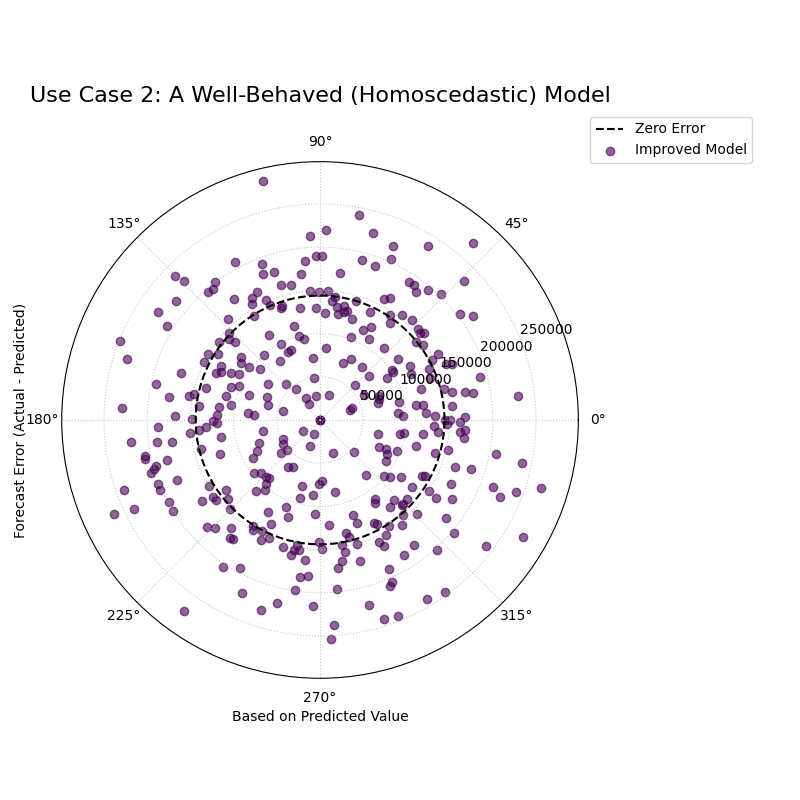
A spiral of error points that maintains a consistent width and is symmetrically scattered around the zero-error reference circle.
See Also
This plot is the direct companion to the
plot_error_relationship() function.
The plot_error_relationship answers: “Are my errors related to the
**actual outcome*?” while plot_residual_relationship()
answers: “Are my errors related to what my **model is predicting*?”*
Both are crucial for a complete diagnosis of model residuals.
For a deeper understanding of the statistical assumptions behind residual analysis, please refer back to the main Residual vs. Predicted Relationship (plot_residual_relationship()) section.
Practical Application: Regression Diagnosis
While the previous examples showcase each function individually, their true analytical power is unleashed when used together in a structured workflow. A robust model evaluation goes beyond a single plot; it involves a systematic investigation from multiple angles to build a complete picture of a model’s behavior.
This case study will walk you through a realistic, multi-step analysis,
demonstrating how the plots from the relationship module can be
combined into a single, comprehensive diagnostic dashboard to solve a
complex modeling problem.
Case Study: Modeling Corporate Growth
The Business Problem: An investment firm wants to model the relationship between a company’s annual R&D spending and its subsequent revenue growth. Understanding this relationship is key to identifying high-potential investment opportunities.
The Models: The data science team has developed two competing models:
“Linear Model”: A simple, interpretable model assuming a straightforward, linear link between R&D and growth.
“ML Model”: A more complex machine learning model (e.g., Gradient Boosting) capable of learning non-linear patterns and providing probabilistic forecasts.
The Core Questions: The firm needs a deep understanding of these models before deploying them:
What is the fundamental response pattern of each model? Does the ML model’s non-linearity seem plausible?
How does the ML model’s uncertainty change? Does it correctly predict more uncertainty for high-growth companies?
Do the models suffer from hidden biases? For instance, do they systematically misjudge companies with very high or very low R&D spending?
Let’s use k-diagram to create a 2x2 diagnostic dashboard to answer
all these questions at once.
Practical Example
 1import kdiagram as kd
 2import pandas as pd
 3import numpy as np
 4import matplotlib.pyplot as plt
 5
 6# --- 1. Data Generation: R&D Spending vs. Revenue Growth ---
 7np.random.seed(42)
 8n_companies = 250
 9# True R&D spending (our feature)
10rd_spending = np.linspace(1, 20, n_companies)
11# True revenue growth has a non-linear, saturating relationship with R&D
12true_growth = 50 - 45 * np.exp(-0.15 * rd_spending) + np.random.normal(0, 1.5, n_companies)
13
14# --- 2. Generate Predictions for Both Models ---
15# Linear Model: A simple straight-line fit
16linear_pred = 2.0 * rd_spending + 5 + np.random.normal(0, 3, n_companies)
17# ML Model: A better non-linear fit
18ml_pred = true_growth + np.random.normal(0, 2, n_companies)
19
20# Probabilistic forecast from the ML Model (heteroscedastic)
21quantiles = np.array([0.1, 0.25, 0.5, 0.75, 0.9])
22error_std = 1.5 + (true_growth / true_growth.max()) * 5
23z_scores = np.array([-1.28, -0.67, 0, 0.67, 1.28])
24ml_quantiles = ml_pred[:, np.newaxis] + z_scores * error_std[:, np.newaxis]
25
26# --- 3. Create a 2x2 Figure for our Diagnostic Dashboard ---
27fig = plt.figure(figsize=(18, 18))
28ax1 = fig.add_subplot(2, 2, 1, projection='polar')
29ax2 = fig.add_subplot(2, 2, 2, projection='polar')
30ax3 = fig.add_subplot(2, 2, 3, projection='polar')
31ax4 = fig.add_subplot(2, 2, 4, projection='polar')
32
33# --- 4. Populate the Dashboard with Diagnostics ---
34# Panel A: High-Level Relationship Comparison
35kd.plot_relationship(
36    true_growth, linear_pred, ml_pred, ax=ax1,
37    names=["Linear Model", "ML Model"],
38    title='(A) Model Response Patterns'
39)
40# Panel B: Conditional Uncertainty of the ML Model
41kd.plot_conditional_quantiles(
42    true_growth, ml_quantiles, quantiles, ax=ax2,
43    bands=[80, 50],
44    title='(B) ML Model Conditional Uncertainty',
45    cmap="tab10"
46)
47# Panel C: Error vs. True Value (Conditional Bias Check)
48kd.plot_error_relationship(
49    true_growth, linear_pred, ml_pred, ax=ax3,
50    names=["Linear Model", "ML Model"],
51    title='(C) Error vs. True Growth (Bias)',
52    cmap="tab10"
53)
54# Panel D: Residual vs. Predicted Value (Heteroscedasticity Check)
55kd.plot_residual_relationship(
56    true_growth, linear_pred, ml_pred, ax=ax4,
57    names=["Linear Model", "ML Model"],
58    title='(D) Residual vs. Predicted Growth (Variance)',
59    cmap="tab10"
60)
61
62fig.suptitle('Comprehensive Regression Diagnostic Dashboard', fontsize=20)
63fig.tight_layout(rect=[0, 0.03, 1, 0.96])
64fig.savefig("gallery/images/gallery_relationship_dashboard.png")
65plt.close(fig)
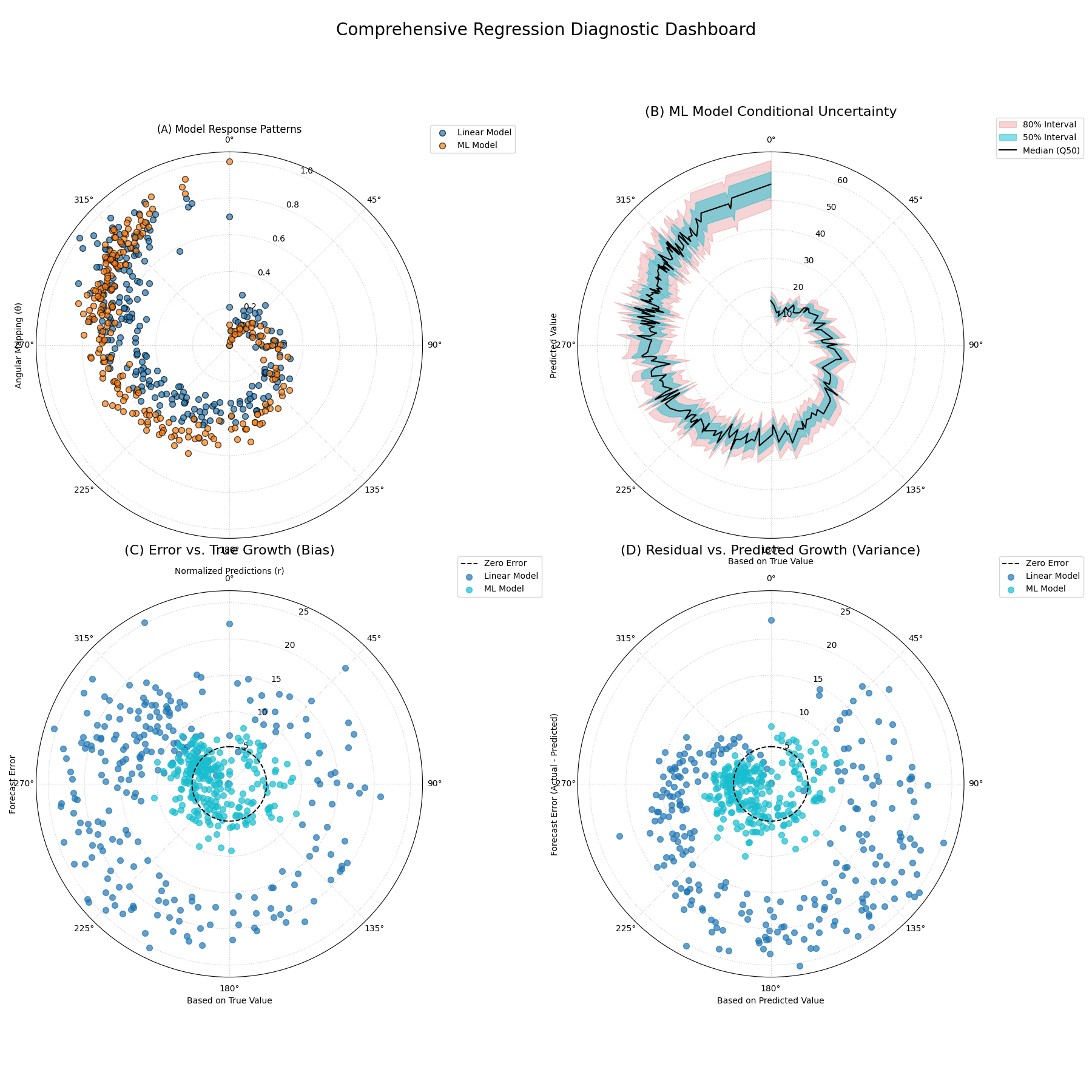
A comprehensive four-panel diagnostic plot comparing a linear and an ML model, showing their response patterns, uncertainty structures, and error characteristics.
For a deeper understanding of the statistical concepts behind these advanced regression diagnostics, please refer back to the main Visualizing Relationships section.