Spatial Diagnostic Plots Gallery
This gallery showcases the complete suite of spatial and polar diagnostic
functions from kdiagram.plot.spatial. The module bridges the gap
between classical tabular forecast evaluation and geographic insight:
every plot here works with any (x, y) or (longitude, latitude)
coordinate system — no basemap library required.
The examples are built around a synthetic land-subsidence monitoring network of 120 wells distributed across a coastal urban–peri-urban–rural gradient (modelled after the Zhongshan, China dataset used in the k-diagram paper). Two Gaussian hotspots in the south create elevated prediction-interval widths and reduced coverage, giving every plot a non-trivial spatial pattern to reveal.
Note
All code can be run locally. Save paths in savefig= must be
adjusted to your output directory. Images are referenced from
../images/spatial/ relative to this file.
Spatial Scatter Plot
The plot_spatial_scatter() function maps any
numeric metric onto a scatter of geographic coordinates. It is the
starting point for spatial forecast evaluation: where is the model
good, and where does it fail?
Plot Anatomy
Position (x, y): Geographic or projected coordinates — longitude and latitude in the examples below, but any consistent unit works.
Color: The primary metric encoded on the colormap. Cold colors indicate low values; warm/bright colors indicate high values.
Marker size (optional): A second numeric column can control bubble area, enabling two-dimensional spatial encoding.
Colorbar: A vertical bar on the right gives the numeric scale.
Use Case 1: Where is the anomaly severity highest?
The simplest and most frequent use is coloring each monitoring station by a single scalar metric — here the anomaly severity score. High-severity clusters immediately reveal geographic regions the model struggles with.
 1import kdiagram as kd
 2import numpy as np
 3import pandas as pd
 4
 5rng = np.random.default_rng(2024)
 6N = 120
 7# ... (build df with 'lon', 'lat', 'severity' columns)
 8
 9ax = kd.plot_spatial_scatter(
10    df, "lon", "lat", "severity",
11    cmap="hot_r", vmin=0, vmax=4.5,
12    s=55, alpha=0.88,
13    colorbar_label="Anomaly Severity Score",
14    title="Spatial Distribution of Forecast Anomaly Severity (H1)",
15    xlabel="Longitude (degrees E)",
16    ylabel="Latitude (degrees N)",
17)
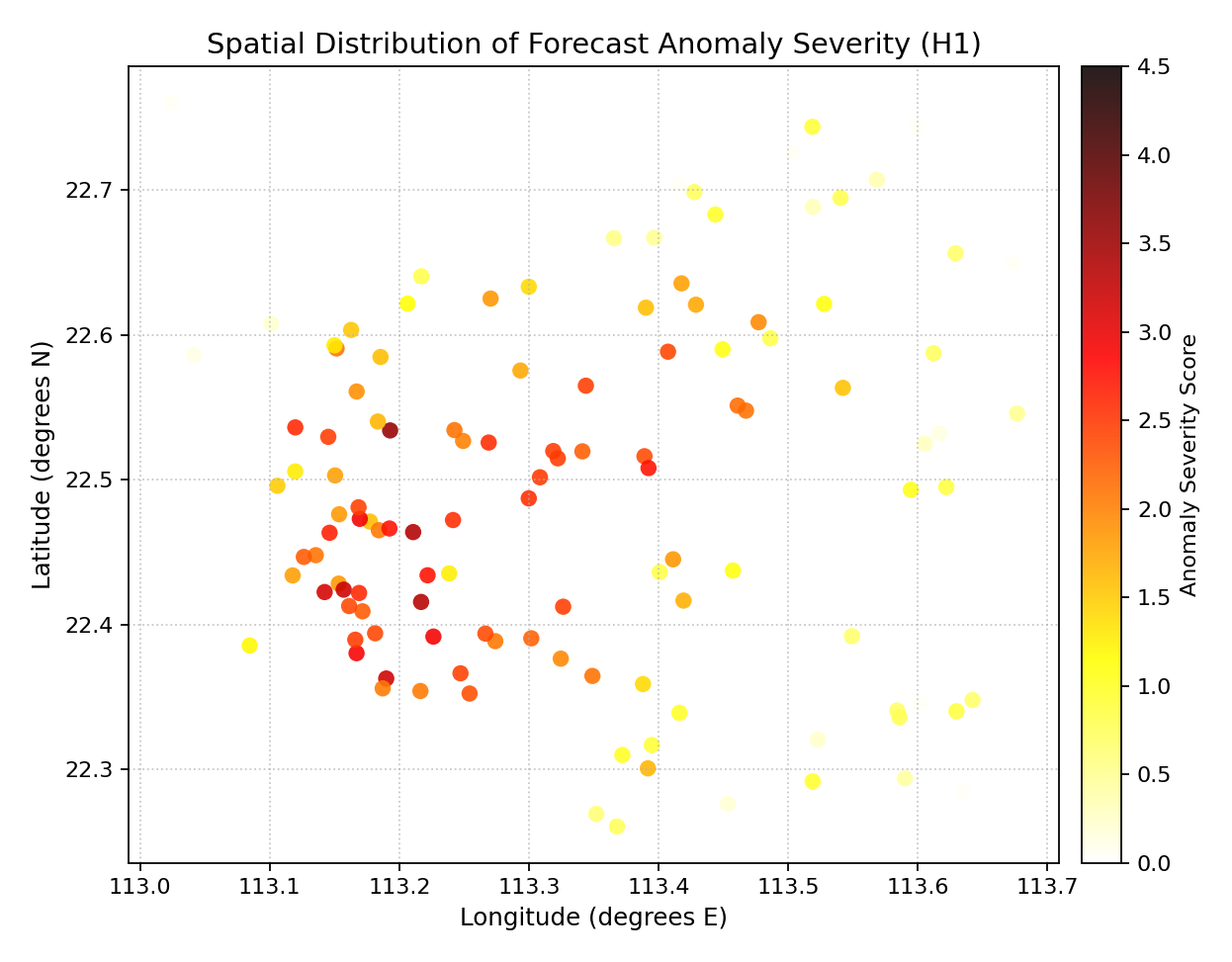
Hot colors (yellow/white) mark the two high-severity hotspots in the southern urban zone. Northern rural stations are dark (low severity).
Use Case 2: Coverage rate and interval width in one view
By mapping coverage rate to color and interval width to bubble size, two critical uncertainty dimensions are encoded simultaneously. A station with a small bubble (narrow interval) and red color (low coverage) is the most dangerous combination — the model is falsely confident.
 1ax = kd.plot_spatial_scatter(
 2    df, "lon", "lat", "coverage",
 3    size_col="width_h1",
 4    size_range=(15, 350),
 5    cmap="RdYlGn", vmin=0.6, vmax=1.0,
 6    alpha=0.82, edgecolor="0.3", linewidths=0.4,
 7    colorbar_label="Empirical Coverage Rate",
 8    title="Coverage Rate (color) vs Interval Width (size) per Station",
 9    xlabel="Longitude (degrees E)",
10    ylabel="Latitude (degrees N)",
11)
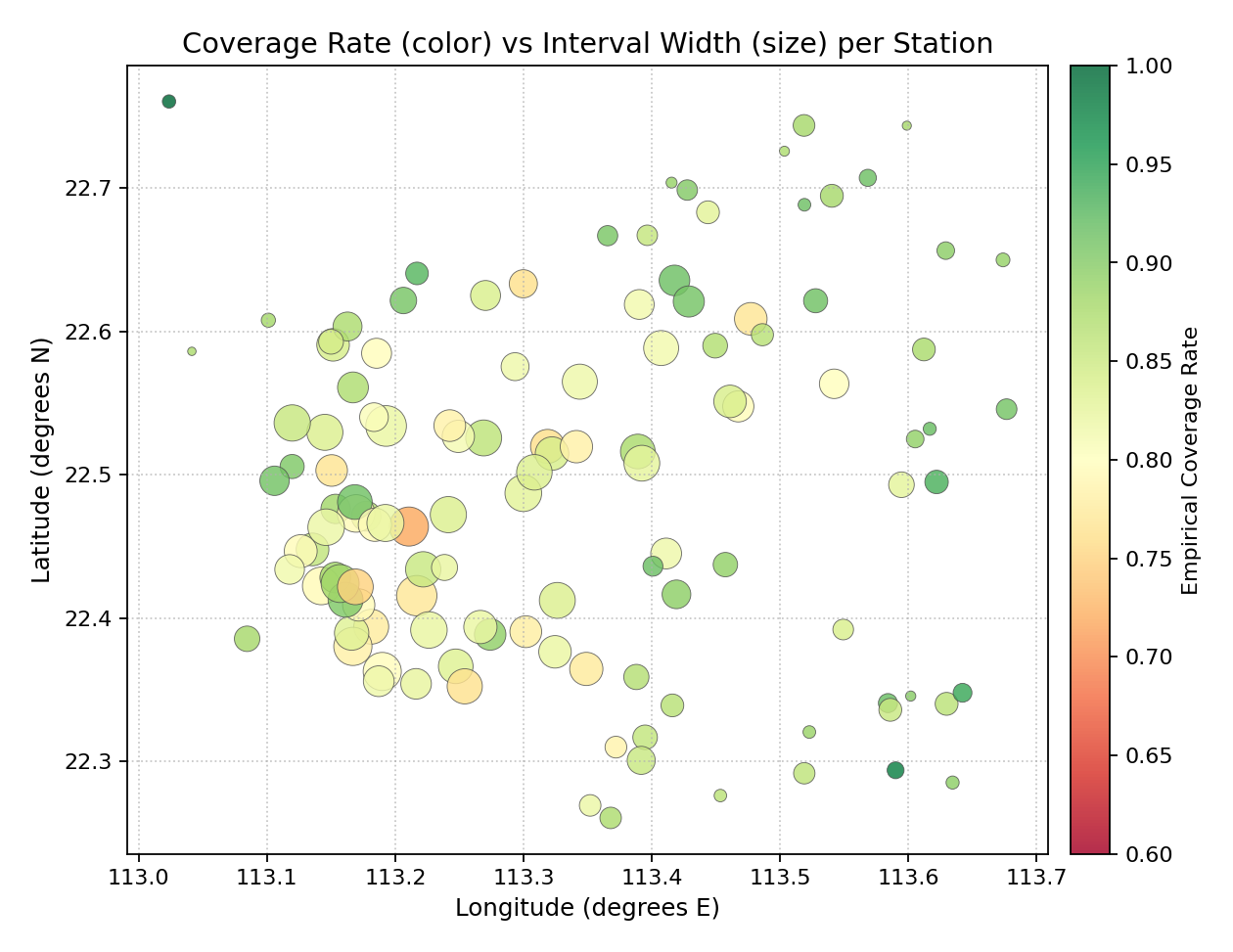
Large green bubbles (north) = wide intervals with good coverage. Small red bubbles (south) = narrow intervals that still under-cover — the riskiest calibration profile.
Spatial Heatmap
The plot_spatial_heatmap() function
interpolates the scattered station observations onto a regular 2-D grid
using scipy.interpolate.griddata and displays the result as a
continuous color surface. This reveals the spatial field underlying
the point measurements, making gradients and transition zones visible.
Plot Anatomy
Continuous surface: Interpolated from the scattered point values. Regions with dense stations are well-constrained; the surface may become less reliable near the edges where stations are sparse.
Scatter overlay: Optional dots (
scatter_overlay=True) show the exact station locations, helping the reader judge where the surface is observation-supported vs. extrapolated.Iso-contours: Optional level lines (
contour=True) draw boundaries between equal-metric zones. Useful for zoning decisions.
Use Case 1: Smooth severity field — identifying spatial gradients
The cubic method produces a smooth, differentiable surface that is ideal for identifying broad spatial gradients and hotspot boundaries.
 1ax = kd.plot_spatial_heatmap(
 2    df, "lon", "lat", "severity",
 3    method="cubic", resolution=250,
 4    contour=False,
 5    scatter_overlay=True,
 6    scatter_s=18, scatter_color="white", scatter_alpha=0.55,
 7    cmap="hot_r", vmin=0, vmax=4.5,
 8    colorbar_label="Anomaly Severity Score",
 9    title="Interpolated Severity Surface (H1) - Cubic Method",
10    xlabel="Longitude (degrees E)",
11    ylabel="Latitude (degrees N)",
12)
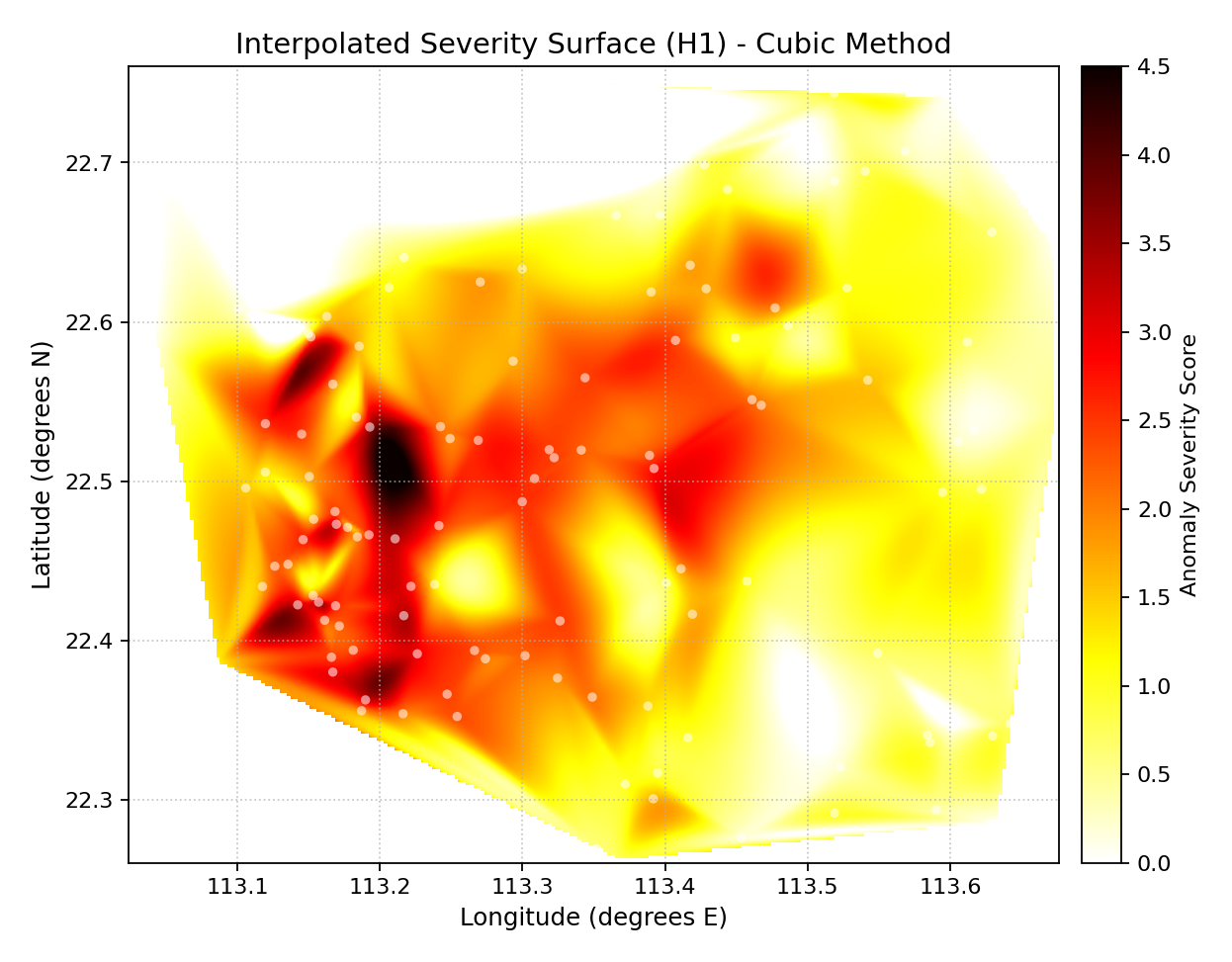
The cubic surface clearly delineates the two hotspot zones as bright islands. White dots confirm that the surface is well-supported by observations throughout the domain.
Use Case 2: Horizon H7 width with iso-contours — zoning for infrastructure
Iso-contour lines divide the domain into discrete width zones, directly translating the heatmap into actionable geographic boundaries (e.g., “Zone A: width > 4 m — elevated monitoring priority”).
 1ax = kd.plot_spatial_heatmap(
 2    df, "lon", "lat", "width_h7",
 3    method="linear", resolution=220,
 4    contour=True, contour_levels=7,
 5    contour_color="white", contour_linewidth=0.9,
 6    scatter_overlay=True, scatter_s=12,
 7    cmap="plasma", vmin=0, vmax=6,
 8    colorbar_label="Interval Width H7 (m)",
 9    title="H7 Interval Width Surface with Iso-Contours",
10    xlabel="Longitude (degrees E)",
11    ylabel="Latitude (degrees N)",
12)
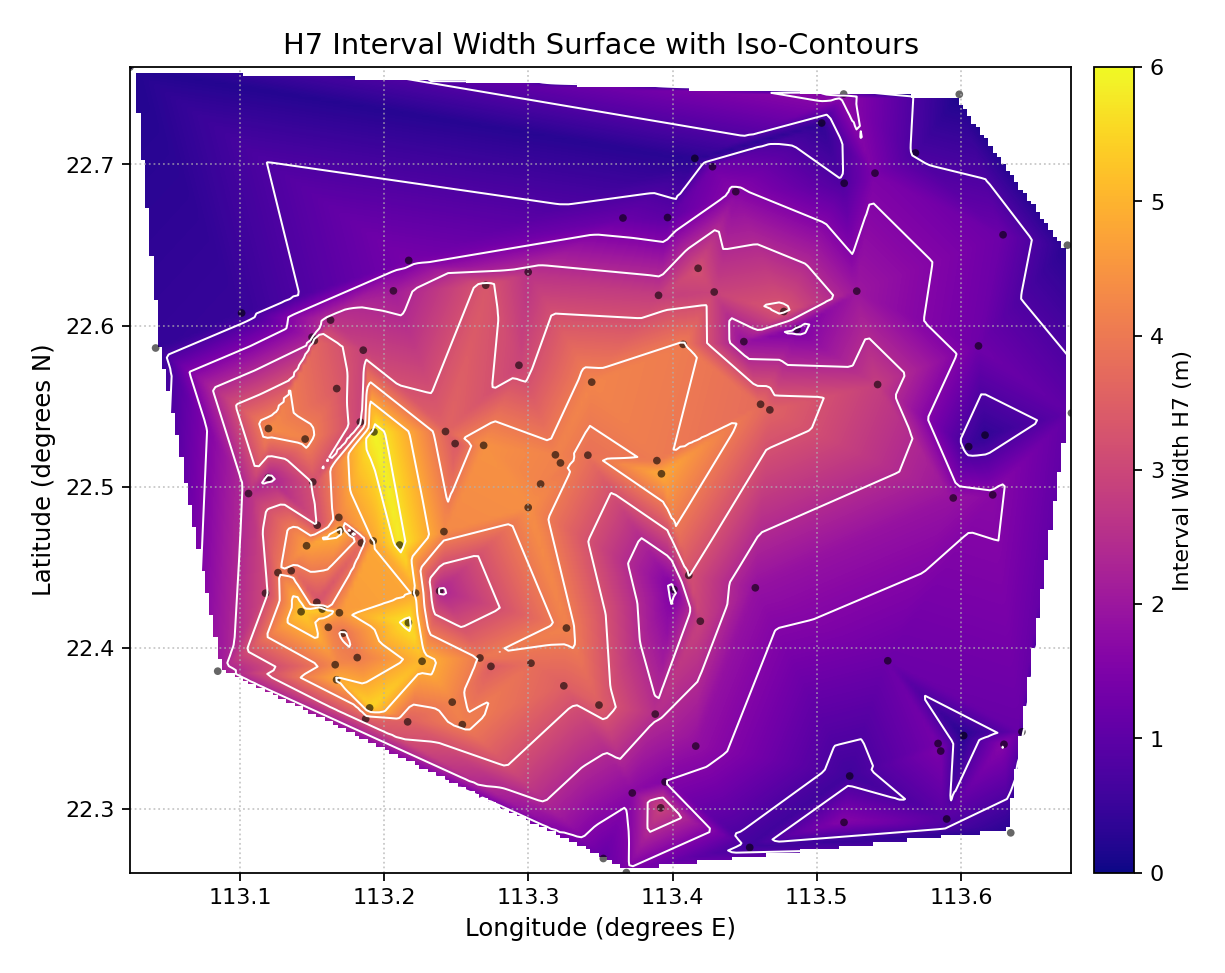
Plasma colormap + white contour lines divide the domain into 7 uncertainty bands. The innermost bright zone marks the highest-uncertainty core.
Spatial Uncertainty Map
The plot_spatial_uncertainty() function
aggregates multiple time steps per station and produces a bubble map
that simultaneously shows two key uncertainty diagnostics:
Bubble size — the mean prediction-interval width at that location.
Bubble color — the deviation of the empirical coverage rate from the nominal level (e.g., 90%).
Plot Anatomy
Large bubbles → wide prediction intervals (high uncertainty).
Small bubbles → narrow intervals (high sharpness — but also high risk if coverage is low).
Blue/cool color → over-coverage (intervals too wide for the nominal level; conservative model).
Red/warm color → under-coverage (intervals too narrow; the model is overconfident at this station).
White/neutral color → coverage close to the nominal level (well-calibrated).
Use Case 1: Global uncertainty overview — width vs. coverage deviation
This is the most informative single-plot summary of a probabilistic forecast evaluated over a spatial network.
 1# df_ts: long-format DataFrame with one row per (station, timestep)
 2ax = kd.plot_spatial_uncertainty(
 3    df_ts, "lon", "lat", "actual", "q10", "q90",
 4    nominal=0.90,
 5    cmap="RdBu_r",
 6    size_range=(20, 450),
 7    alpha=0.83,
 8    title="Uncertainty Map: Width (size) vs Coverage Deviation (color)",
 9    xlabel="Longitude (degrees E)",
10    ylabel="Latitude (degrees N)",
11)
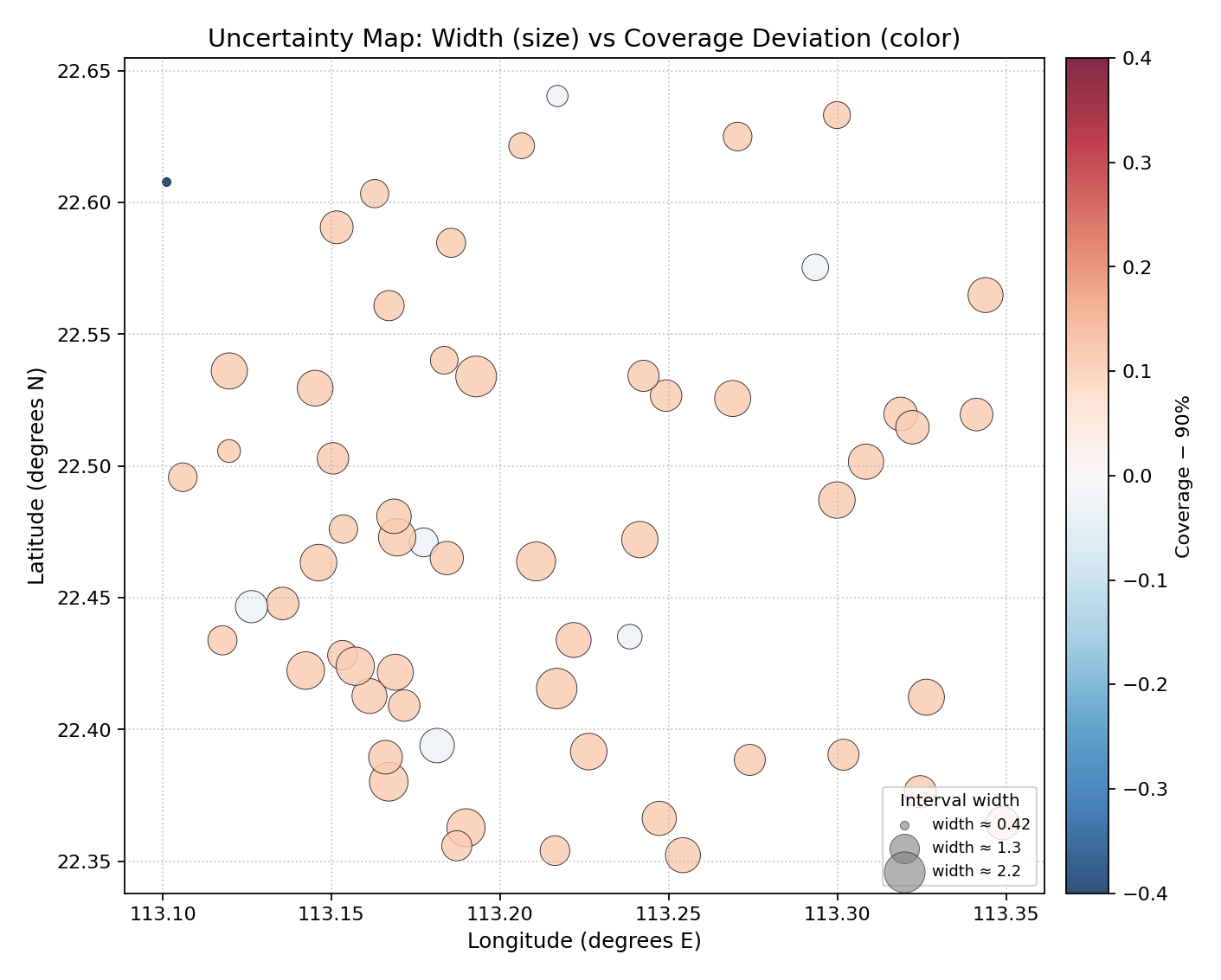
Red = under-coverage (overconfident station); blue = over-coverage (conservative); large bubble = wide interval. Southern stations are red and have small-to-medium bubbles — the dangerous overconfident cluster.
Use Case 2: Diagnosing a southern under-coverage hotspot
By amplifying the coverage deficit in southern stations, the plot isolates the overconfident cluster and makes the geographic boundary of the failure zone clearly visible.
 1# Tighten intervals for southern stations to amplify the hotspot
 2df_ts3 = df_ts.copy()
 3south_mask = df_ts3["lat"] < 22.50
 4df_ts3.loc[south_mask, "q90"] -= 0.5   # shrink upper bound
 5
 6ax = kd.plot_spatial_uncertainty(
 7    df_ts3, "lon", "lat", "actual", "q10", "q90",
 8    nominal=0.90,
 9    cmap="coolwarm",
10    size_range=(25, 500),
11    alpha=0.80,
12    title="Southern Hotspot: Under-Coverage Cluster Revealed",
13    xlabel="Longitude (degrees E)",
14    ylabel="Latitude (degrees N)",
15)
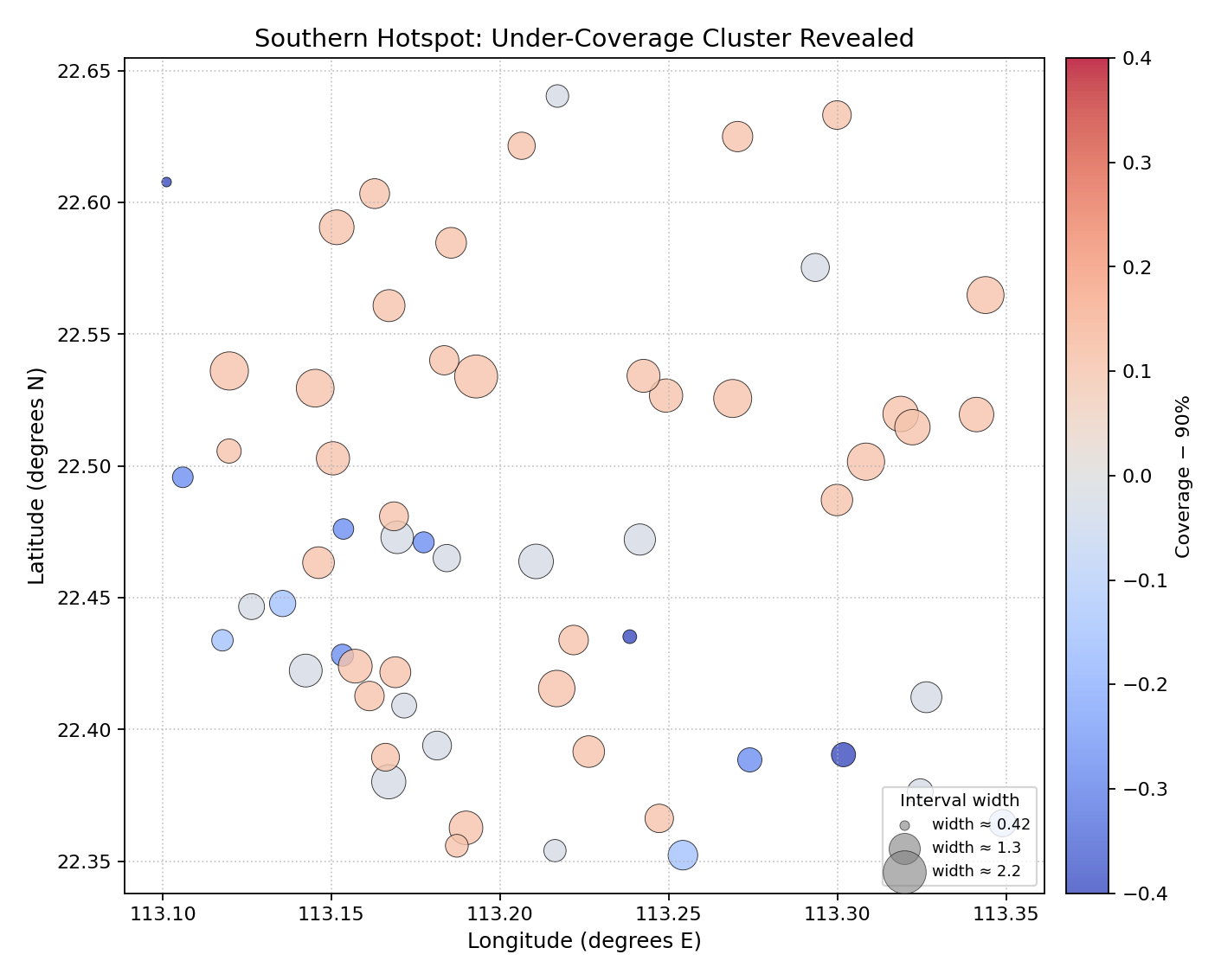
The southern under-coverage cluster is now clearly separated (red, small) from the northern over-coverage zone (blue, larger). The transition zone in the middle is visible as white stations.
Spatial Coverage Map
The plot_spatial_coverage() function maps
pre-computed coverage rates (one value per station, already
aggregated externally) onto a scatter using a diverging colormap centered
on the nominal level. An optional tolerance parameter flags stations that
exceed an acceptable deviation with a star marker.
Plot Anatomy
Color (diverging): Blue = above-nominal coverage (conservative model); red = below-nominal (overconfident); white = exactly nominal.
Star overlay (
annotate=True):** Stations outside the tolerance band are additionally marked with a star to draw attention.Colorbar: Centered on the nominal level; the color scale spans deviations in both directions.
Use Case 1: Network-wide coverage audit against the 90% nominal
A single map reveals which stations the model fails to cover at the contracted reliability level and by how much.
1ax = kd.plot_spatial_coverage(
2    df, "lon", "lat", "coverage",
3    nominal=0.90,
4    cmap="RdBu",
5    s=70, alpha=0.88,
6    title="Coverage Rate Deviation from 90% Nominal",
7    xlabel="Longitude (degrees E)",
8    ylabel="Latitude (degrees N)",
9)
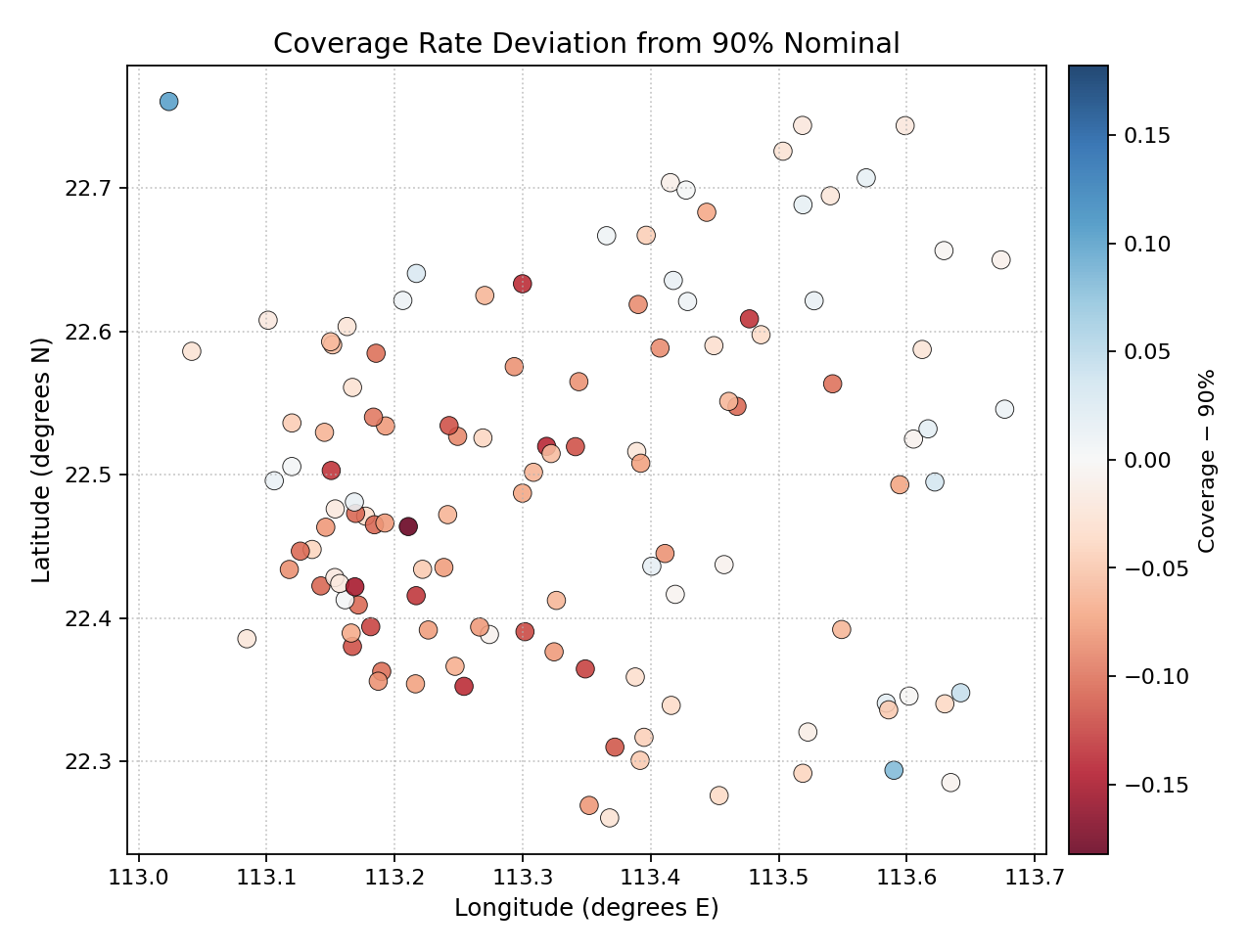
Red stations (south) are under-covered; blue stations (north) are over-covered. The white band in the middle marks the well-calibrated transition zone.
Use Case 2: Flagging stations that violate a contractual tolerance
In operational settings a ±8% tolerance is often contractually defined.
Setting tol=0.08 adds a star marker to every station outside this
band, making compliance audits immediate.
 1ax = kd.plot_spatial_coverage(
 2    df, "lon", "lat", "cov_xtft",   # XTFT model coverage
 3    nominal=0.90, tol=0.08,
 4    cmap="RdBu",
 5    s=65, alpha=0.85,
 6    annotate=True,
 7    title="XTFT Coverage: Stations Outside +-8% Tolerance Flagged",
 8    xlabel="Longitude (degrees E)",
 9    ylabel="Latitude (degrees N)",
10)
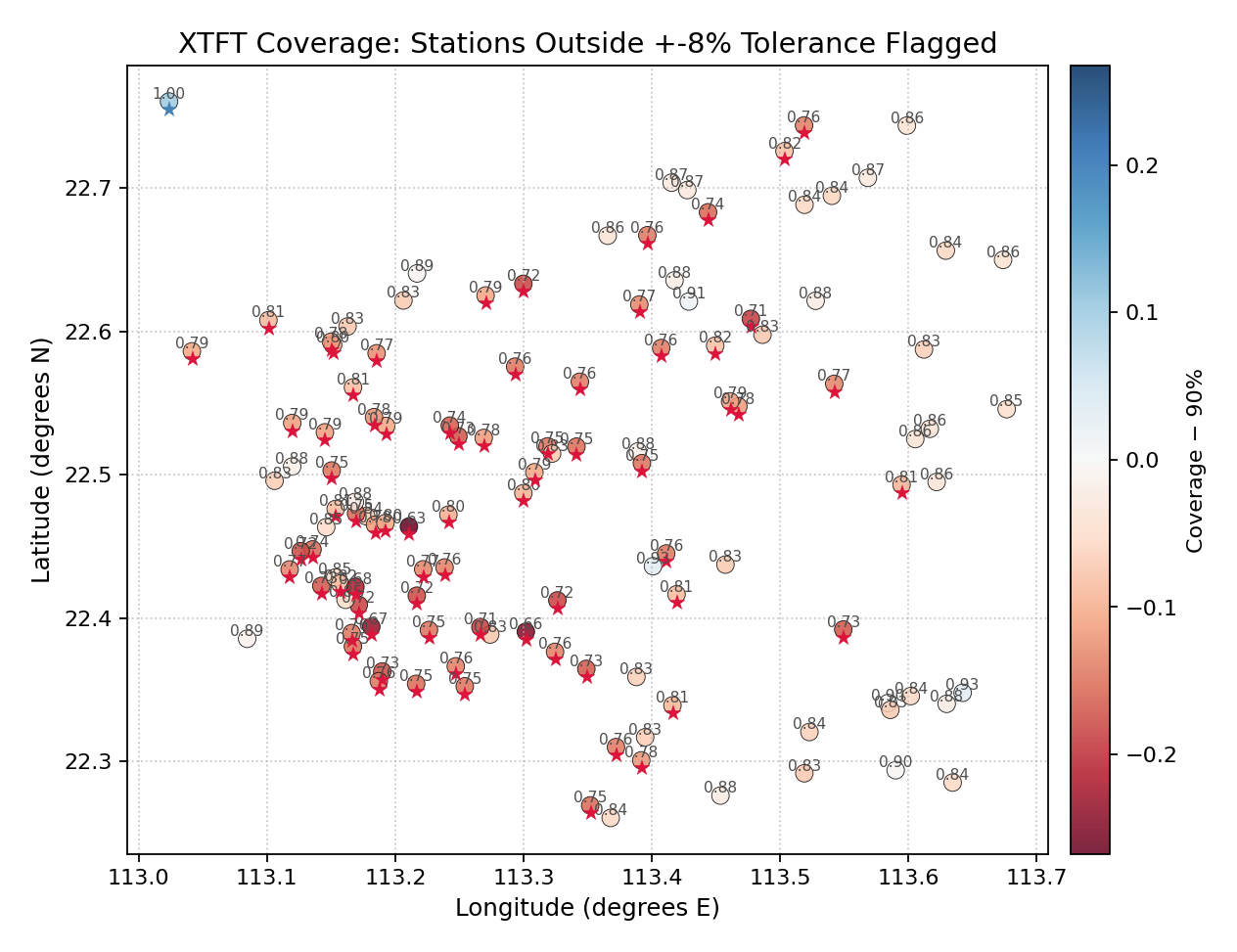
Star markers identify the XTFT stations that violate the +-8% tolerance. The stars cluster in the south, confirming that the coverage failures are geographically concentrated.
Multi-Model Spatial Comparison
The plot_spatial_comparison() function
produces an N-panel grid, one panel per model or condition, all on a
shared color scale. It is the standard way to answer: “Which model
has the lowest interval width everywhere? Are the improvements
geographically uniform?”
Plot Anatomy
Panel grid: One panel per model/condition. Layout controlled by
ncols.Shared colorbar: A single colorbar (right-most column) applies to all panels when
shared_scale=True, making cross-panel comparisons rigorous.Panel titles: Derived from the
nameslist or the raw column name if not provided.
Use Case 1: Three-model H1 interval width comparison
Side-by-side maps answer at a glance: “Which model produces the narrowest prediction intervals, and is the improvement geographically uniform?”
1axes = kd.plot_spatial_comparison(
2    df, "lon", "lat",
3    metric_cols=["width_qar", "width_qgbm", "width_xtft"],
4    names=["QAR", "QGBM", "XTFT"],
5    ncols=3, shared_scale=True,
6    cmap="plasma", s=45, alpha=0.85,
7    colorbar_label="Interval Width H1 (m)",
8)
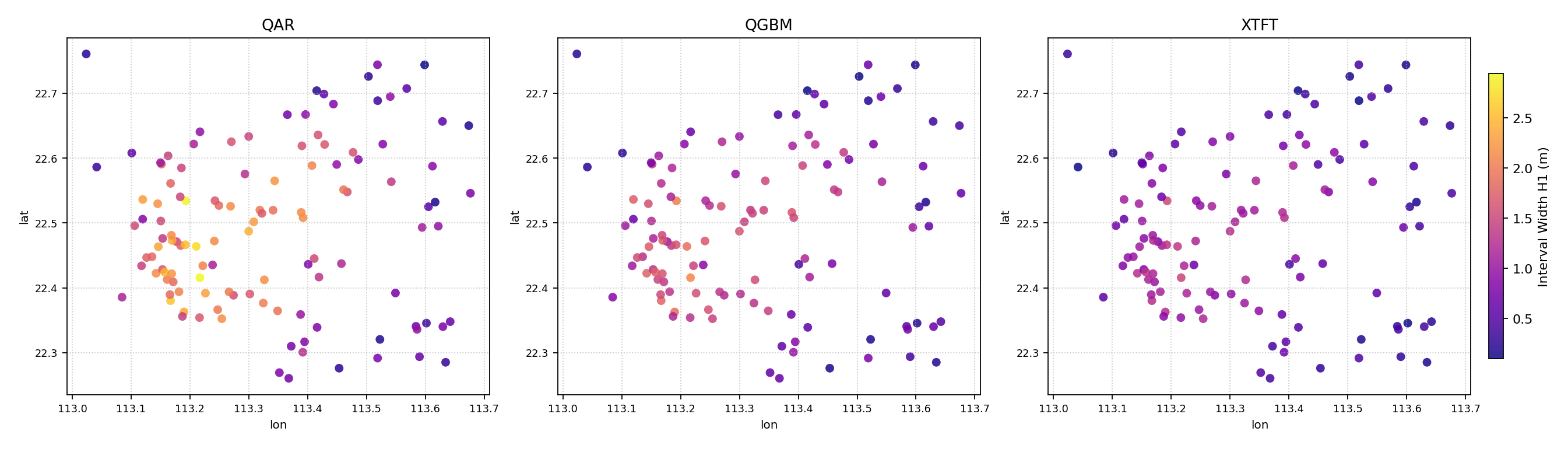
Left to right: QAR (wide, high coverage), QGBM (balanced), XTFT (narrow, sharp). The hotspot geometry is identical across all three models, but the color intensity scales down from left to right, confirming XTFT is consistently sharper.
Use Case 2: Horizon evolution — does uncertainty grow uniformly?
Using metric_cols as a list of horizon columns reveals whether the
model’s uncertainty growth is spatially uniform or concentrated in
specific areas.
1axes = kd.plot_spatial_comparison(
2    df, "lon", "lat",
3    metric_cols=["width_h1", "width_h3", "width_h5", "width_h7"],
4    names=["H1", "H3", "H5", "H7"],
5    ncols=2, shared_scale=True,
6    cmap="viridis", s=40, alpha=0.85,
7    colorbar_label="Interval Width (m)",
8)
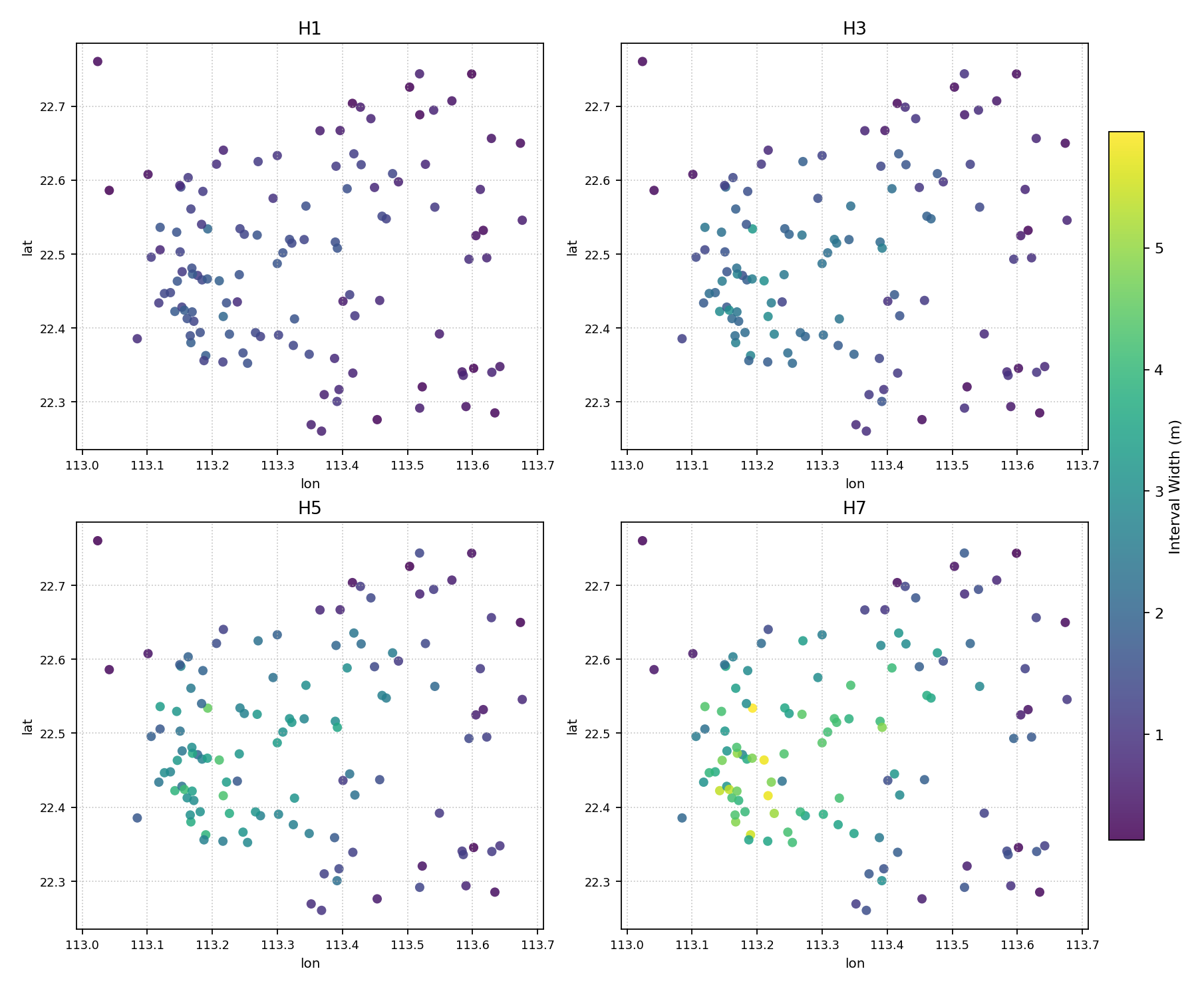
Top row: H1 (narrow) and H3; bottom: H5 and H7 (wide). The southern hotspot grows brighter with horizon, showing that uncertainty amplifies most in the already-difficult zone.
Geographic Ordering Map
The plot_spatial_ordering() function renders
the site ordering that underpins the polar diagnostics. Sites are
ranked 0 → N−1 by a geographic criterion (latitude, longitude, or any
custom column) and color-coded by that rank. Optional arrows trace the
traversal path so the reader can follow the ordering across the domain.
This plot is the key to reading the polar hedgehog diagrams: it answers the question “which geographic location corresponds to which polar angle?”
Plot Anatomy
Color (sequential): Encodes rank — dark = first site (rank 0), bright = last site (rank N−1).
Arrows: Connect consecutive sites in rank order. Arrow density is controlled by
arrow_step(default N//15).Annotations: The
label_siteslist marks a subset of sites with their 1-based rank number, giving the polar plots a look-up key.
Use Case 1: South-to-north ordering by latitude
The default ordering traverses the domain from the southernmost station (rank 0, polar angle ~0°) to the northernmost (rank N−1, polar angle ~360°).
 1ax = kd.plot_spatial_ordering(
 2    df, "lon", "lat",
 3    order_by="lat", order_ascending=True,
 4    show_arrows=True, arrow_step=8,
 5    label_sites=[0, 29, 59, 89, 119],
 6    colorbar_label="Site order (0 = southernmost)",
 7    title="Geographic Domain: Site Ordering (South to North)",
 8    xlabel="Longitude (degrees E)",
 9    ylabel="Latitude (degrees N)",
10)
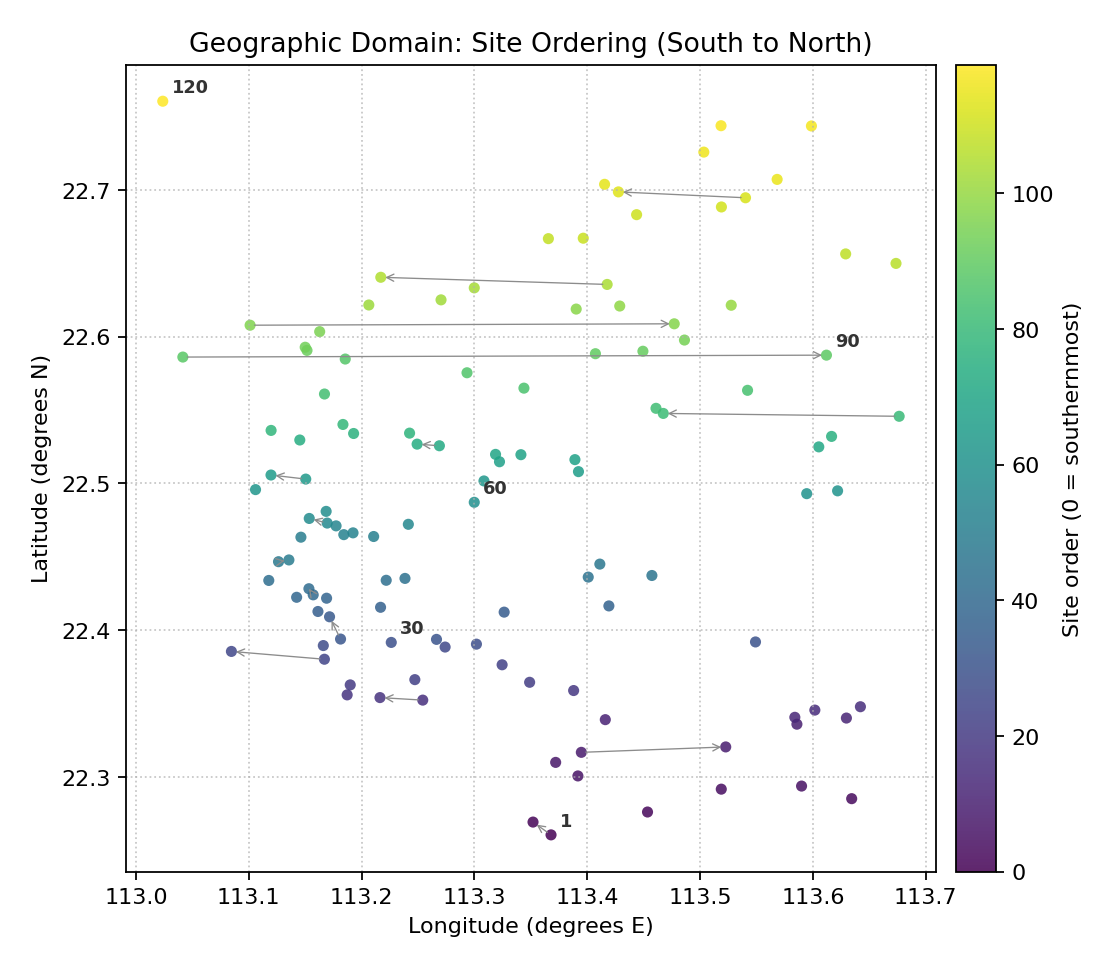
Dark (low rank) stations are southernmost; bright (high rank) are northernmost. Arrows trace the monotonic south-to-north traversal. Labeled stations 1, 30, 60, 90, 120 map to polar angles 0, pi/2, pi, 3*pi/2, 2*pi respectively.
Use Case 2: West-to-east ordering by longitude
Switching to order_by="lon" redefines the polar angle assignment
and produces a completely different polar diagnostic — useful for
comparing the structure of the metric in the two orthogonal spatial
directions.
 1ax = kd.plot_spatial_ordering(
 2    df, "lon", "lat",
 3    order_by="lon", order_ascending=True,
 4    show_arrows=True, arrow_step=8,
 5    cmap="plasma",
 6    label_sites=[0, 39, 79, 119],
 7    colorbar_label="Site order (0 = westernmost)",
 8    title="Geographic Domain: Site Ordering (West to East)",
 9    xlabel="Longitude (degrees E)",
10    ylabel="Latitude (degrees N)",
11)
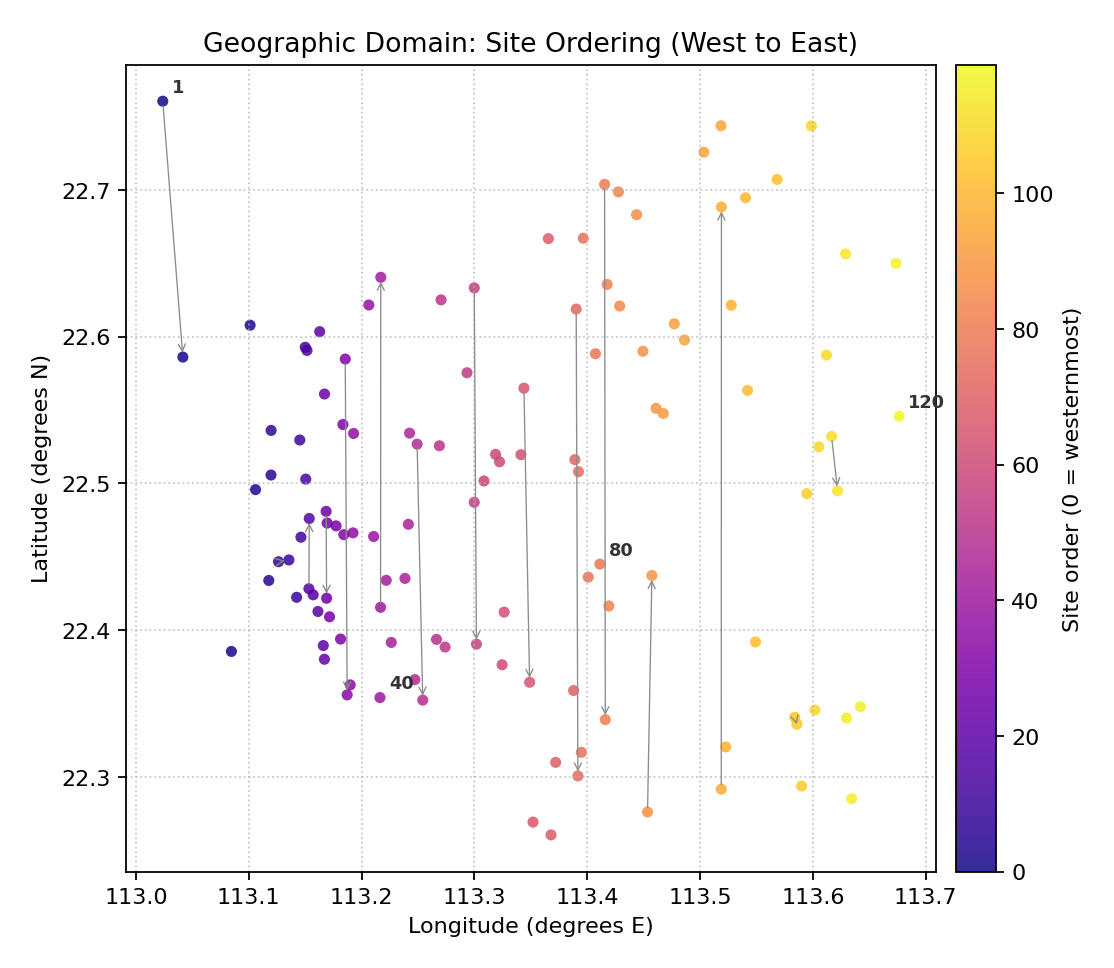
Plasma colormap; dark = west, bright = east. Arrows cross latitude bands, producing a zigzag traversal rather than the monotonic sweep seen in the latitude ordering.
Polar Hedgehog Diagnostic
The plot_polar_from_spatial() function is
the central visualization of the spatial-polar framework. Each site
is represented as a radial spike (needle) on a polar plot:
Angle (\(\theta_i = 2\pi i / N\)) encodes the geographic rank.
Radius encodes the metric value at that site.
Long spikes mark high-metric sites; the angular position tells you where those sites are in the ordering, and by consulting the companion ordering map you know where they are geographically.
A second mode (ring mode, via horizon_cols) places concentric
rings for multiple horizons or conditions, enabling simultaneous
comparison across the full ordering spectrum.
Plot Anatomy
Spike angle: Geographic rank → polar angle. North (top) = rank 0 (first site); the angle increases clockwise by default.
Spike length (radius): Metric value. Longer = higher metric.
Spike color (single-horizon): A second column, or the metric itself, drives the colormap.
Reference rings: Faint dashed circles at regular radii help read absolute metric values.
Ring labels (ring mode): The label for each concentric ring is placed at a fixed angle for quick identification.
Use Case 1: Severity hedgehog — where is the model worst?
This is the primary use: a compact 360° summary of how severity is distributed across the ordered sites. A cluster of long spikes in one angular arc reveals a geographic concentration of forecast failures.
1ax = kd.plot_polar_from_spatial(
2    df, "lon", "lat", "severity",
3    order_by="lat",
4    cmap="hot_r",
5    n_ring_labels=4,
6    colorbar_label="Anomaly Severity Score",
7    title="Polar Diagnostic: Severity Distribution Across Ordered Sites",
8)
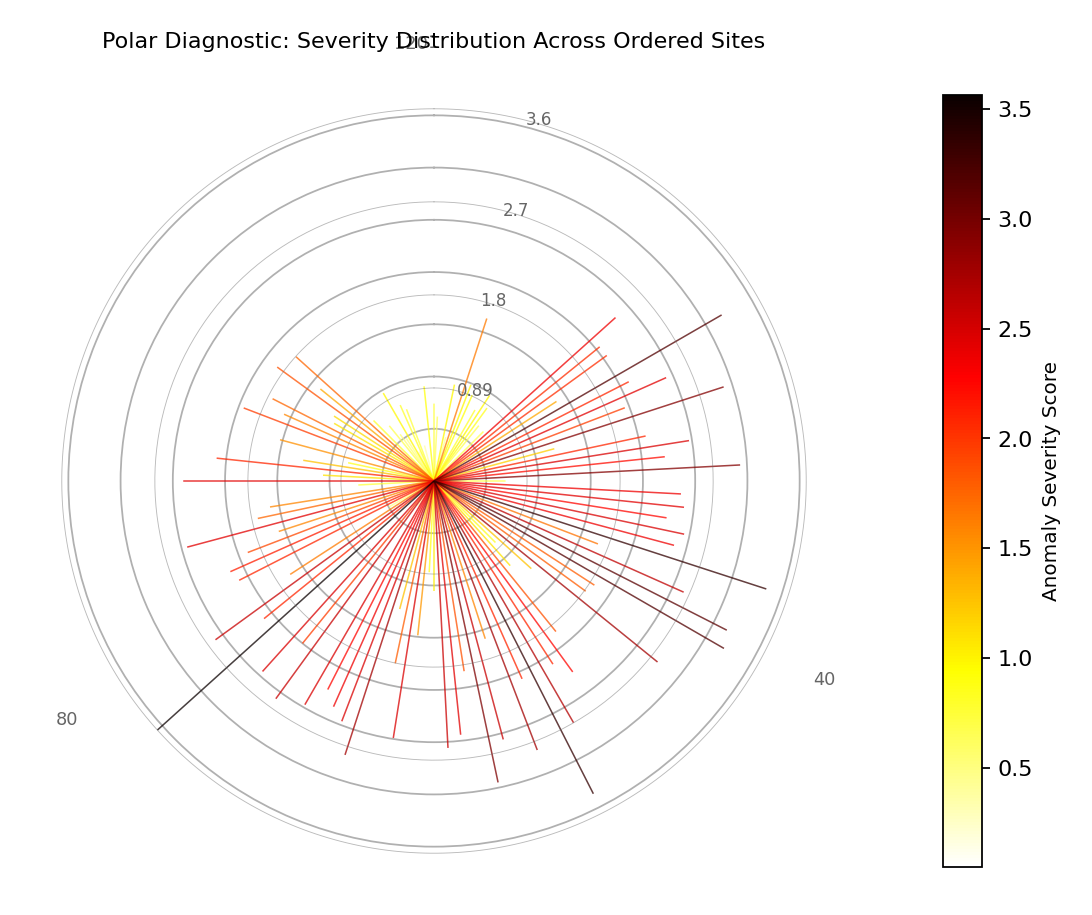
Long, bright spikes in the lower arc (ranks 0-40, southern sites) confirm that severity is concentrated in the south. Northern sites (top arc) have short, dark spikes — the model performs well there.
Use Case 2: Multi-horizon ring encoding H1 → H7
By passing horizon_cols the function switches to ring mode:
each ring corresponds to one forecast horizon, stacked outward from the
center. This allows the evolution of uncertainty with horizon to be
read at every site simultaneously.
1ax = kd.plot_polar_from_spatial(
2    df, "lon", "lat", "width_h1",
3    horizon_cols=["width_h3", "width_h5", "width_h7"],
4    horizon_labels=["H1", "H3", "H5", "H7"],
5    horizon_colors=["#4393c3", "#f4a582", "#d6604d", "#a50026"],
6    order_by="lat",
7    title="Multi-Horizon Ring: Uncertainty Growth from H1 (inner) to H7 (outer)",
8)
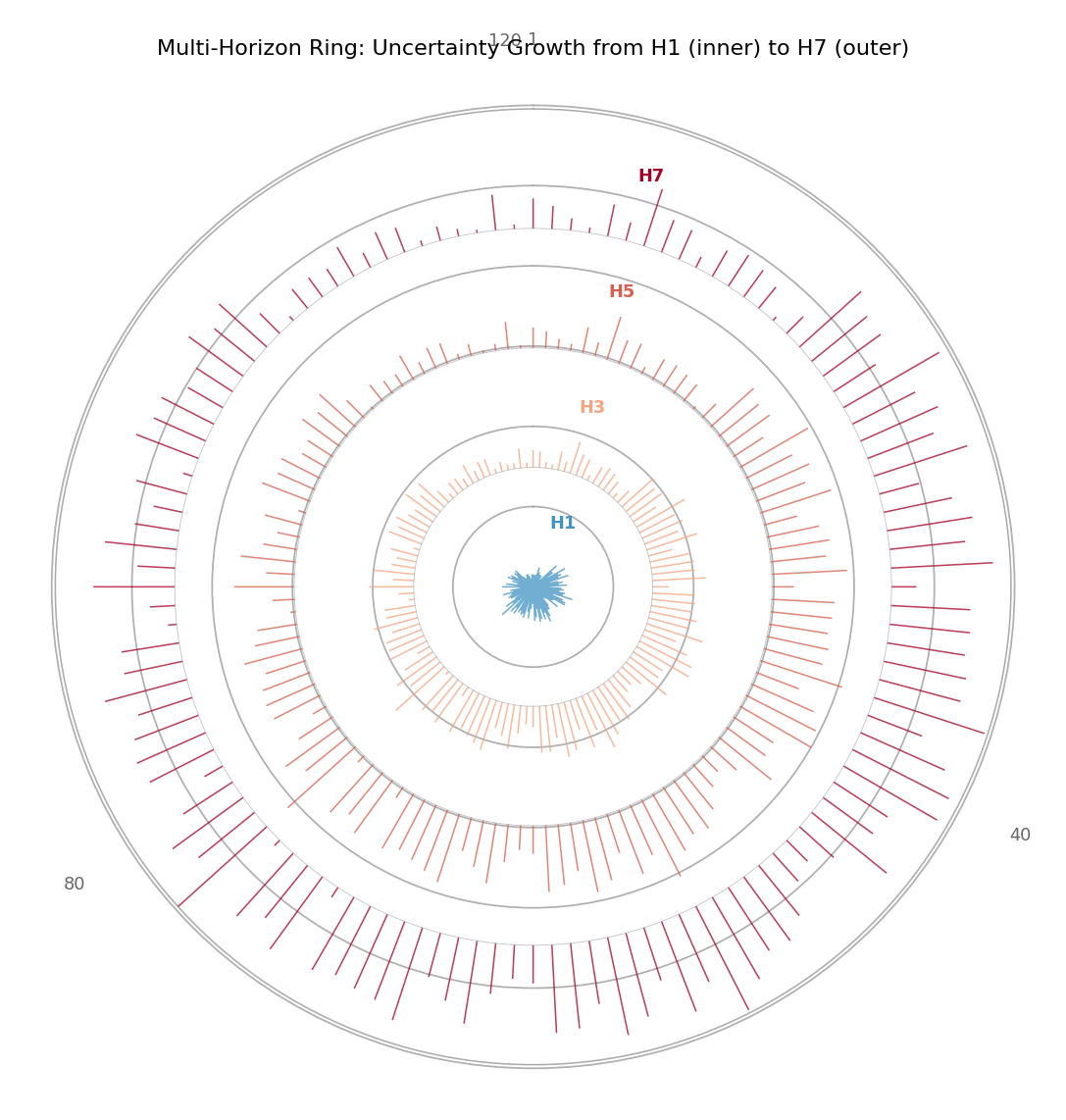
Four concentric rings: H1 (innermost blue) to H7 (outermost red). The southern arc shows the largest radial growth from H1 to H7 — uncertainty amplifies most where the model is already weakest.
Use Case 3: Decoupled color and radius — severity on width spikes
Setting color_col to a different column from metric_col encodes
two independent spatial patterns on the same hedgehog: spike length
shows one metric (interval width) while spike color shows another
(anomaly severity).
1ax = kd.plot_polar_from_spatial(
2    df, "lon", "lat", "width_h1",
3    color_col="severity",         # severity drives color
4    order_by="lat",
5    cmap="RdYlGn_r",
6    colorbar_label="Anomaly Severity (color)",
7    title="Polar Diagnostic: Width (radius) vs Severity (color)",
8)
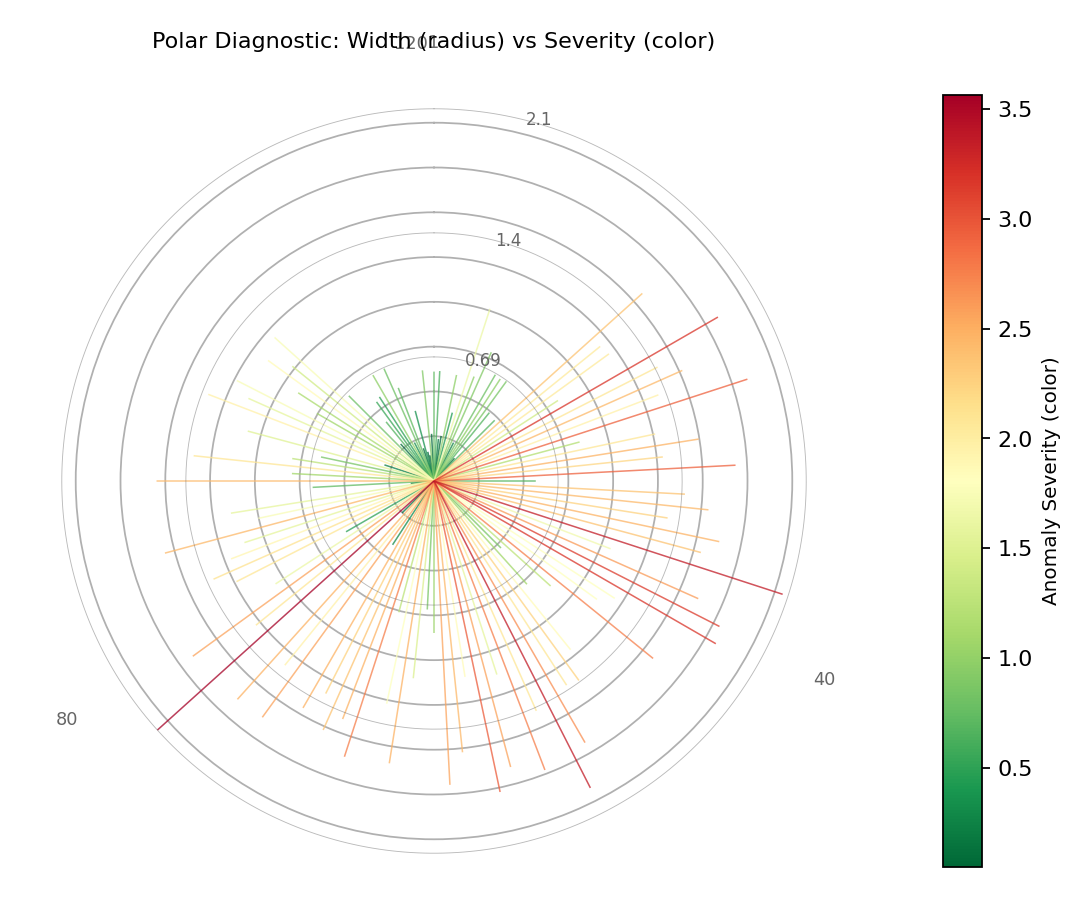
Long AND bright (red) spikes mark the most problematic sites: wide prediction intervals AND high severity. Long but green spikes indicate wide but well-placed intervals.
Paired Spatial + Polar Diagnostic
The plot_paired_spatial_polar() function
creates the two-panel composite that is the signature figure of the
k-diagram spatial-polar framework. It directly reproduces the paired
(a)+(b) and (c)+(d) panel layouts of the paper’s Figures 2 and 5:
Left panel: Geographic scatter map colored by the metric.
Right panel: Polar hedgehog diagnostic with the same metric and colormap.
Both panels share the same colormap, making the correspondence between geographic location and polar angle immediately readable.
Plot Anatomy
Left — geographic map: Color = metric value. Optional site labels (
map_label_sites) and ordering arrows allow the reader to trace polar angle back to geography.Right — hedgehog: Angle = latitude rank; radius = metric. Site labels at the circle perimeter (
label_n_sites) cross- reference the map labels.Shared colorbar: One colorbar on the map panel applies to both.
Use Case 1: Single-horizon H1 paired view (replicates paper Fig 2)
The canonical paired view for a single forecast horizon. Three sites are annotated on the map so the reader can locate them in the polar diagnostic by their polar angle.
1axes = kd.plot_paired_spatial_polar(
2    df, "lon", "lat", "width_h1",
3    order_by="lat",
4    cmap="YlOrRd",
5    colorbar_label="Interval Width H1 (m)",
6    map_label_sites={0: "S1", 59: "S2", 119: "S3"},
7    title="Paired View: H1 Interval Width (map + polar diagnostic)",
8    figsize=(13, 6),
9)
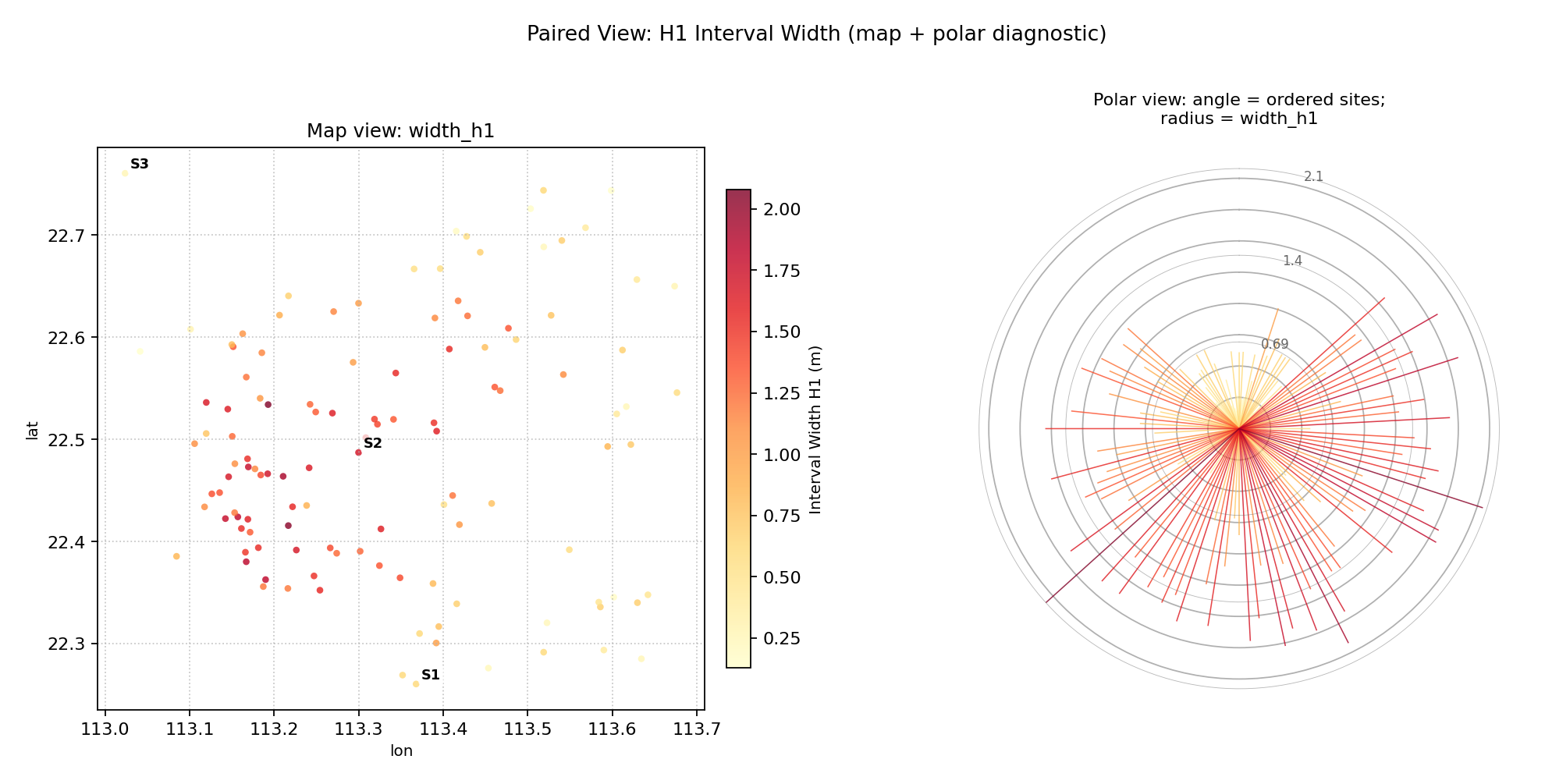
Left: scatter map of H1 width. Right: polar hedgehog. Site S1 (southernmost, rank 0) maps to the top of the polar circle; S3 (northernmost, rank 119) maps to just before the top after a full revolution. Long red spikes in the south confirm the hotspot.
Use Case 2: Multi-horizon paired view (replicates paper Fig 5)
Activating horizon_cols in the paired view places concentric
rings in the polar panel while keeping the geographic scatter as the
companion reference.
 1axes = kd.plot_paired_spatial_polar(
 2    df, "lon", "lat", "width_h1",
 3    horizon_cols=["width_h3", "width_h5", "width_h7"],
 4    horizon_labels=["H1", "H3", "H5", "H7"],
 5    horizon_colors=["#4393c3", "#f4a582", "#d6604d", "#a50026"],
 6    order_by="lat",
 7    cmap="viridis",
 8    title="Multi-Horizon Paired View (H1 inner ring to H7 outer ring)",
 9    figsize=(13, 6),
10)
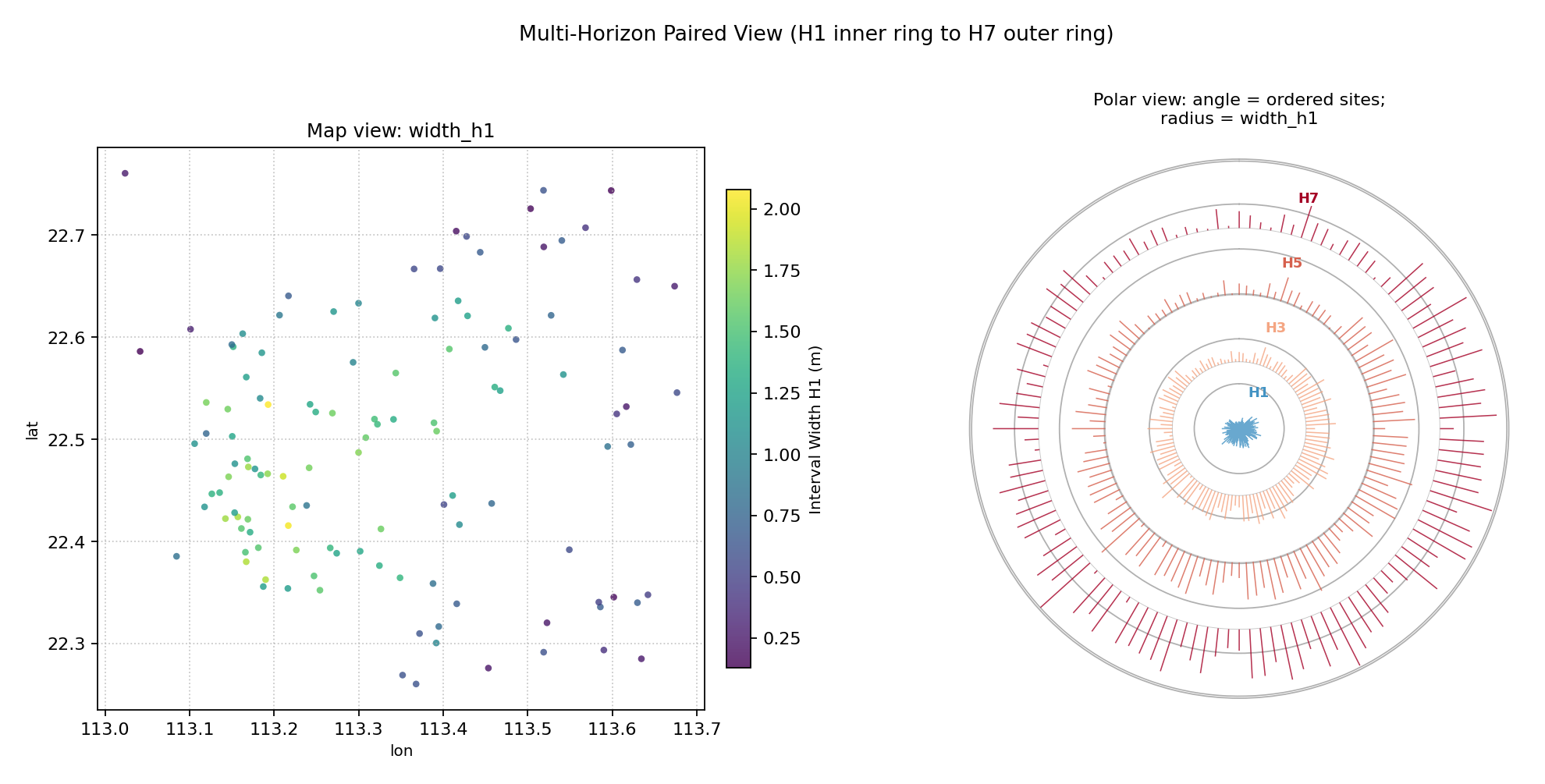
The polar panel shows four concentric rings (H1 blue inner to H7 red outer). Southern sites show dramatic outward ring growth; northern sites have thin, uniform rings. The map confirms which geographic cluster is responsible.
Application: Complete Spatial Forecast Evaluation Dashboard
In production, all eight spatial-polar functions combine into a single evaluation dashboard that guides the full diagnostic workflow:
Orient — the ordering map tells you how geography maps to polar angle.
Locate — the scatter / heatmap identifies where the metric is high.
Quantify — the polar hedgehog summarises the distribution of every site simultaneously.
Diagnose — the paired view reads map and hedgehog in tandem.
Compare — the comparison panel evaluates multiple models or horizons.
The following code assembles a compact 4-panel dashboard combining four of these views for the land-subsidence network.
 1import kdiagram as kd
 2import matplotlib.pyplot as plt
 3import numpy as np
 4import pandas as pd
 5
 6# ... (build df with lon, lat, severity, width_h1-h7 columns)
 7
 8fig = plt.figure(figsize=(15, 12))
 9fig.suptitle(
10    "Land Subsidence Forecast Evaluation Dashboard\n"
11    "Spatial Map + Polar Diagnostics + Multi-Horizon Ring",
12    fontsize=13,
13)
14
15ax_map  = fig.add_subplot(2, 2, 1)
16ax_pol  = fig.add_subplot(2, 2, 2, projection="polar")
17ax_ord  = fig.add_subplot(2, 2, 3)
18ax_pol2 = fig.add_subplot(2, 2, 4, projection="polar")
19
20# (A) Severity scatter map
21kd.plot_spatial_scatter(
22    df, "lon", "lat", "severity",
23    cmap="hot_r", vmin=0, vmax=4.5, s=35, alpha=0.85,
24    colorbar_label="Severity", ax=ax_map,
25    title="(A) Severity Map",
26    xlabel="Longitude", ylabel="Latitude",
27)
28
29# (B) Single-horizon polar hedgehog
30kd.plot_polar_from_spatial(
31    df, "lon", "lat", "severity",
32    order_by="lat", cmap="hot_r",
33    colorbar=False, label_n_sites=5,
34    title="(B) Polar Diagnostic (H1)",
35    ax=ax_pol,
36)
37
38# (C) Site ordering reference map
39kd.plot_spatial_ordering(
40    df, "lon", "lat", order_by="lat",
41    show_arrows=True, arrow_step=10,
42    label_sites=[0, 59, 119],
43    colorbar=False,
44    title="(C) Site Ordering (S to N)",
45    xlabel="Longitude", ylabel="Latitude",
46    ax=ax_ord,
47)
48
49# (D) Multi-horizon ring diagram
50kd.plot_polar_from_spatial(
51    df, "lon", "lat", "width_h1",
52    horizon_cols=["width_h3", "width_h5", "width_h7"],
53    horizon_labels=["H1", "H3", "H5", "H7"],
54    horizon_colors=["#4393c3", "#f4a582", "#d6604d", "#a50026"],
55    order_by="lat", n_ring_labels=0, label_n_sites=4,
56    title="(D) Multi-Horizon Rings",
57    ax=ax_pol2,
58)
59
60fig.tight_layout()
61fig.savefig("dashboard.png", dpi=150, bbox_inches="tight")
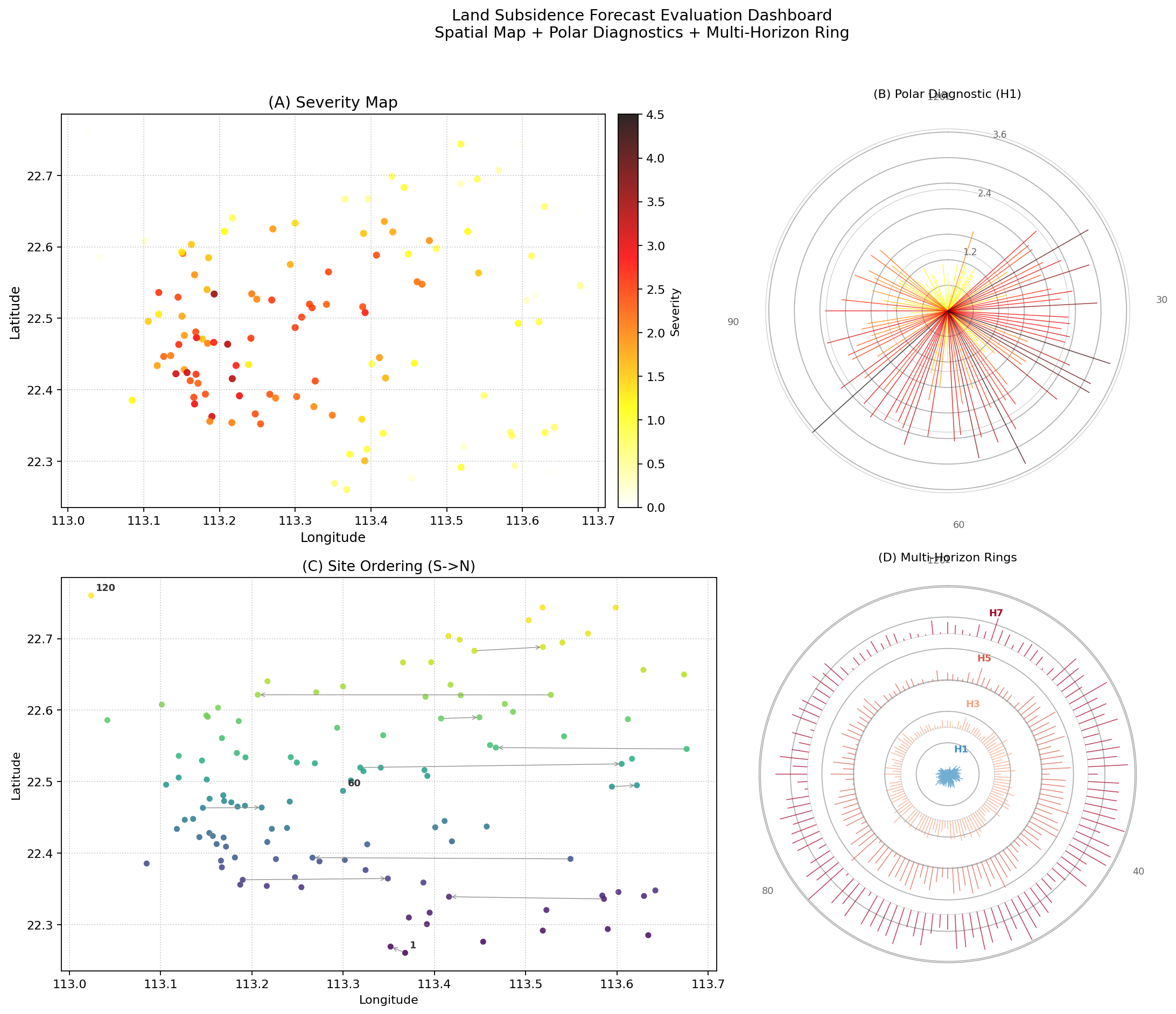
Best Practice
Always present the ordering map (C) alongside the polar hedgehog
(B/D). Without (C) the reader cannot know which angular arc
corresponds to which geographic region. The paired view
(plot_paired_spatial_polar()) automates
this pairing, but the standalone ordering map is useful when the
domain layout itself needs to be explained in detail.
For the mathematical background of the spatial-polar mapping, please refer to plot_polar_from_spatial — Core polar hedgehog diagnostic. For the API reference of all functions, see API Reference.