Uncertainty Visualizations
This page showcases examples of plots specifically designed for exploring, diagnosing, and communicating aspects of predictive uncertainty using k-diagram.
Note
You need to run the code snippets locally to generate the plot
images referenced below (e.g., ../images/gallery_actual_vs_predicted.png).
Ensure the image paths in the .. image:: directives match where
you save the plots (likely an images subdirectory relative to
this file, e.g., ../images/).
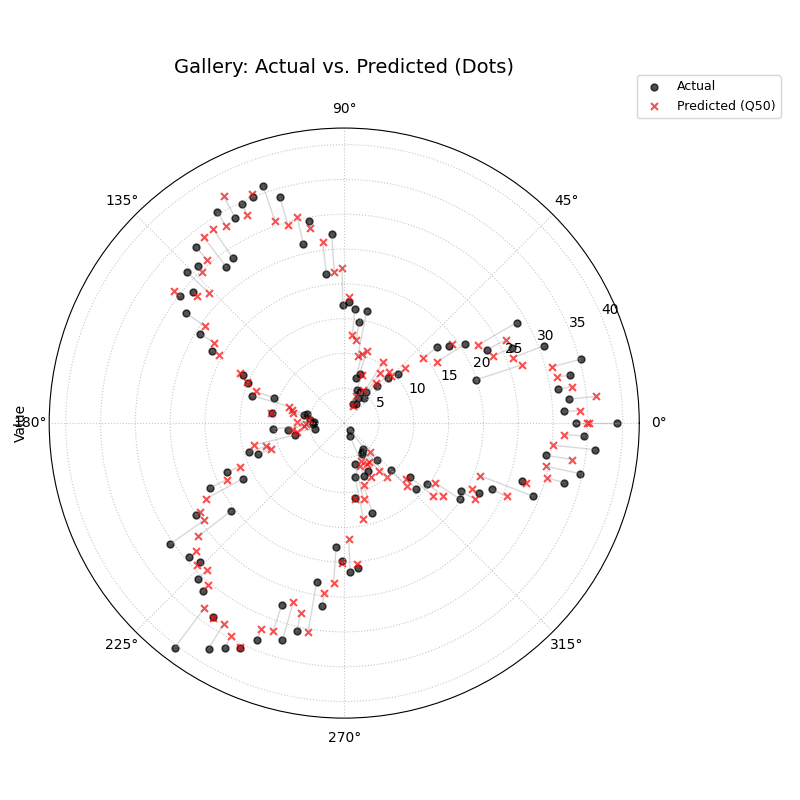
Actual vs. Predicted
Compares actual observed values against point predictions (e.g., Q50) sample-by-sample. Useful for assessing basic accuracy and bias.
 1import kdiagram as kd
 2import pandas as pd
 3import numpy as np
 4import matplotlib.pyplot as plt
 5
 6# --- Data Generation ---
 7np.random.seed(66)
 8n_points = 120
 9df = pd.DataFrame({'sample': range(n_points)})
10signal = 20 + 15 * np.cos(np.linspace(0, 6 * np.pi, n_points))
11df['actual'] = signal + np.random.randn(n_points) * 3
12df['predicted'] = signal * 0.9 + np.random.randn(n_points) * 2 + 2
13
14# --- Plotting ---
15kd.plot_actual_vs_predicted(
16    df=df,
17    actual_col='actual',
18    pred_col='predicted',
19    title='Gallery: Actual vs. Predicted (Dots)',
20    line=False, # Use dots instead of lines
21    r_label="Value",
22    actual_props={'s': 25, 'alpha': 0.7, 'color':'black'}, # Explicit color
23    pred_props={'s': 35, 'marker': 'x', 'alpha': 0.7, 'color':'red'}, # Explicit color & size
24    # Save the plot (adjust path relative to docs/source/)
25    savefig="gallery/images/gallery_actual_vs_predicted.png"
26)
27plt.close() # Close the plot window after saving
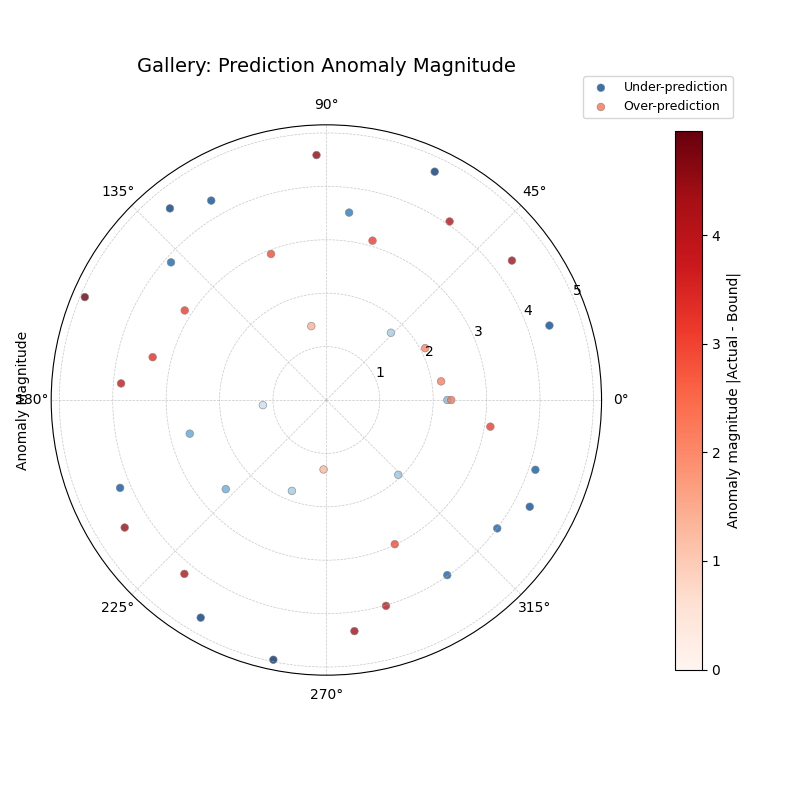
Anomaly Magnitude
Highlights instances where the actual value falls outside the prediction interval [Qlow, Qup]. Shows the location (angle), type (color), and severity (radius) of anomalies.
 1import kdiagram as kd
 2import pandas as pd
 3import numpy as np
 4import matplotlib.pyplot as plt
 5
 6# --- Data Generation ---
 7np.random.seed(42)
 8n_points = 180
 9df = pd.DataFrame({'sample_id': range(n_points)})
10df['actual'] = np.random.normal(loc=20, scale=5, size=n_points)
11df['q10'] = df['actual'] - np.random.uniform(2, 6, size=n_points)
12df['q90'] = df['actual'] + np.random.uniform(2, 6, size=n_points)
13# Add anomalies
14under_indices = np.random.choice(n_points, 20, replace=False)
15df.loc[under_indices, 'actual'] = df.loc[under_indices, 'q10'] - \
16                                   np.random.uniform(1, 5, size=20)
17available = list(set(range(n_points)) - set(under_indices))
18over_indices = np.random.choice(available, 20, replace=False)
19df.loc[over_indices, 'actual'] = df.loc[over_indices, 'q90'] + \
20                                  np.random.uniform(1, 5, size=20)
21
22# --- Plotting ---
23kd.plot_anomaly_magnitude(
24    df=df,
25    actual_col='actual',
26    q_cols=['q10', 'q90'],
27    title="Gallery: Prediction Anomaly Magnitude",
28    cbar=True,
29    s=30,
30    verbose=0, # Keep output clean for gallery
31    # Save the plot (adjust path relative to docs/source/)
32    savefig="gallery/images/gallery_anomaly_magnitude.png"
33)
34plt.close()
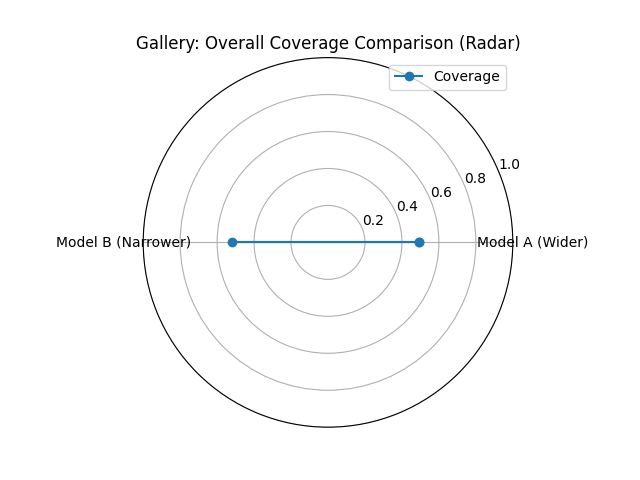
Overall Coverage
Calculates and displays the overall empirical coverage rate(s) compared to the nominal rate. Useful for comparing average interval calibration across models. Shown here with a radar plot for two simulated models.
 1import kdiagram as kd
 2import numpy as np
 3import matplotlib.pyplot as plt
 4
 5# --- Data Generation ---
 6np.random.seed(42)
 7y_true = np.random.rand(100) * 10
 8# Model 1 (e.g., ~80% coverage)
 9y_pred_q1 = np.sort(np.random.normal(
10    loc=y_true[:, np.newaxis], scale=1.5, size=(100, 2)), axis=1)
11# Model 2 (e.g., ~60% coverage - narrower intervals)
12y_pred_q2 = np.sort(np.random.normal(
13    loc=y_true[:, np.newaxis], scale=0.8, size=(100, 2)), axis=1)
14q_levels = [0.1, 0.9] # Nominal 80% interval
15
16# --- Plotting ---
17kd.plot_coverage(
18    y_true,
19    y_pred_q1,
20    y_pred_q2,
21    names=['Model A (Wider)', 'Model B (Narrower)'],
22    q=q_levels,
23    kind='radar', # Use radar chart for profile comparison
24    title='Gallery: Overall Coverage Comparison (Radar)',
25    cov_fill=True,
26    verbose=0,
27    # Save the plot (adjust path relative to docs/source/)
28    savefig="gallery/images/gallery_coverage_radar.png"
29)
30plt.close()
Coverage Diagnostic
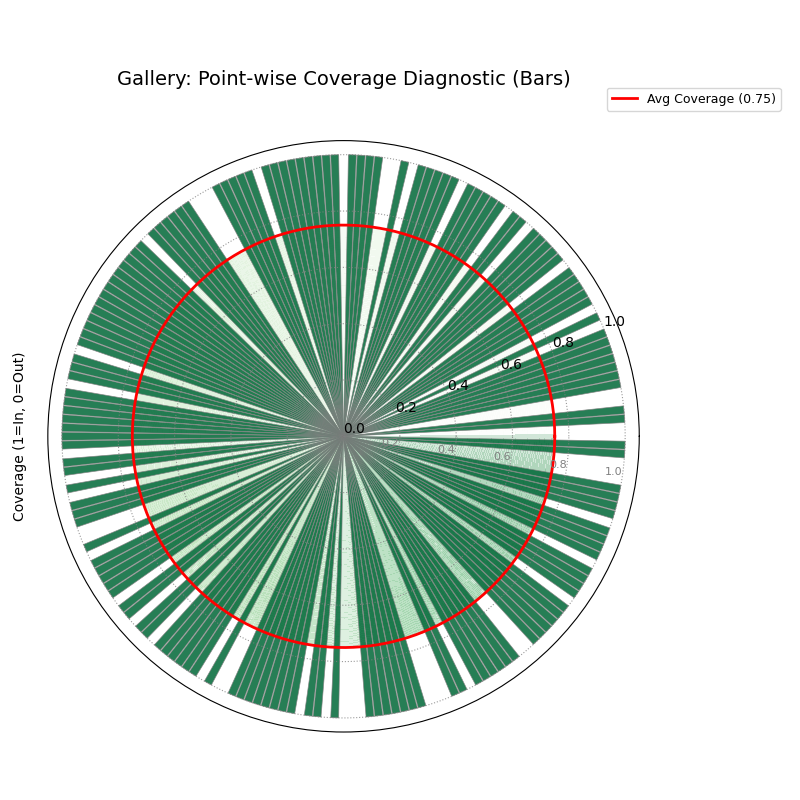
Visualizes coverage success (radius 1) or failure (radius 0) for each individual data point. Helps diagnose where intervals fail. The solid line shows the overall average coverage rate. Shown here using bars.
 1import kdiagram as kd
 2import pandas as pd
 3import numpy as np
 4import matplotlib.pyplot as plt
 5
 6# --- Data Generation ---
 7np.random.seed(88)
 8n_points = 200
 9df = pd.DataFrame({'point_id': range(n_points)})
10df['actual_val'] = np.random.normal(loc=5, scale=1.5, size=n_points)
11df['q_lower'] = 5 - np.random.uniform(1, 3, n_points)
12df['q_upper'] = 5 + np.random.uniform(1, 3, n_points)
13# Some points deliberately outside
14df.loc[::15, 'actual_val'] = df.loc[::15, 'q_upper'] + 1
15
16# --- Plotting ---
17kd.plot_coverage_diagnostic(
18    df=df,
19    actual_col='actual_val',
20    q_cols=['q_lower', 'q_upper'],
21    title='Gallery: Point-wise Coverage Diagnostic (Bars)',
22    as_bars=True, # Display as bars instead of scatter
23    fill_gradient=True, # Show background gradient
24    coverage_line_color='darkorange', # Example customization
25    verbose=0,
26    # Save the plot (adjust path relative to docs/source/)
27    savefig="gallery/images/gallery_coverage_diagnostic_bars.png"
28)
29plt.close()
Interval Consistency
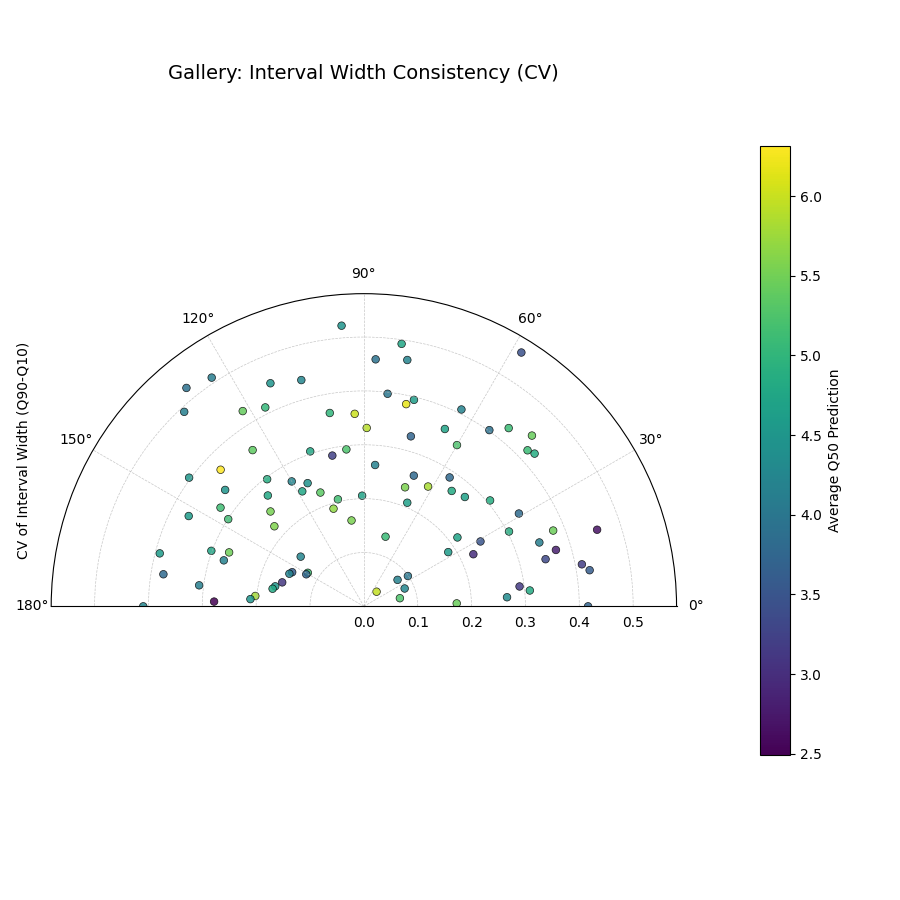
Analyzes the stability of the prediction interval width (Qup - Qlow) for each location over multiple time steps. Radius shows variability (CV or Std Dev); color often shows average Q50. High radius means inconsistent width.
 1import kdiagram as kd
 2import pandas as pd
 3import numpy as np
 4import matplotlib.pyplot as plt
 5
 6# --- Data Generation ---
 7np.random.seed(42)
 8n_points = 100
 9n_years = 4
10years = list(range(2021, 2021 + n_years))
11df = pd.DataFrame({'id': range(n_points)})
12qlow_cols, qup_cols, q50_cols = [], [], []
13for i, year in enumerate(years):
14    ql, qu, q50 = f'val_{year}_q10', f'val_{year}_q90', f'val_{year}_q50'
15    qlow_cols.append(ql); qup_cols.append(qu); q50_cols.append(q50)
16    base_low = np.random.rand(n_points)*5 + i*0.2
17    width = np.random.rand(n_points)*3 + 1 + np.sin(
18        np.linspace(0, np.pi, n_points))*i # Vary width
19    df[ql] = base_low; df[qu] = base_low + width
20    df[q50] = base_low + width/2 + np.random.randn(n_points)*0.5
21
22# --- Plotting ---
23kd.plot_interval_consistency(
24    df=df,
25    qlow_cols=qlow_cols,
26    qup_cols=qup_cols,
27    q50_cols=q50_cols, # Color by average Q50
28    use_cv=True,       # Radius = Coefficient of Variation of width
29    title='Gallery: Interval Width Consistency (CV)',
30    acov='half_circle',
31    cmap='viridis',
32    # Save the plot (adjust path relative to docs/source/)
33    savefig="gallery/images/gallery_interval_consistency_cv.png"
34)
35plt.close()
Interval Width
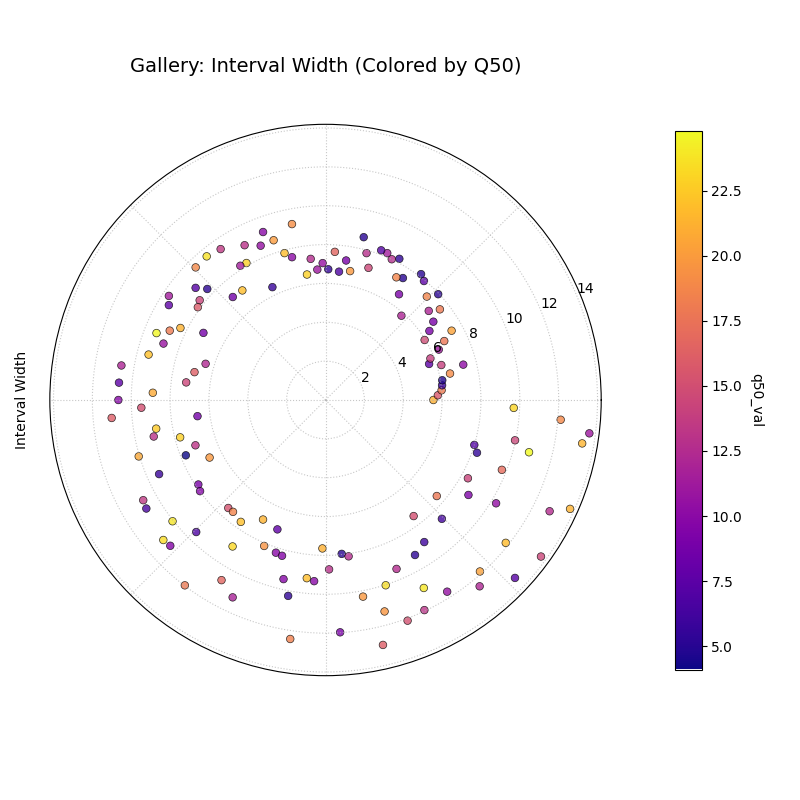
Visualizes the magnitude of the prediction interval width (Qup - Qlow) for each sample at a single time point. Radius directly represents the width. Color can represent width or an optional third variable (z_col), here showing the Q50 prediction.
 1import kdiagram as kd
 2import pandas as pd
 3import numpy as np
 4import matplotlib.pyplot as plt
 5
 6# --- Data Generation ---
 7np.random.seed(77)
 8n_points = 150
 9df = pd.DataFrame({'location': range(n_points)})
10df['elevation'] = np.linspace(100, 500, n_points) # Example feature
11df['q10_val'] = np.random.rand(n_points) * 20
12# Width depends on elevation in this synthetic example
13width = 5 + (df['elevation'] / 100) * np.random.uniform(0.5, 2, n_points)
14df['q90_val'] = df['q10_val'] + width
15df['q50_val'] = df['q10_val'] + width / 2 # Use as z_col
16
17# --- Plotting ---
18kd.plot_interval_width(
19    df=df,
20    q_cols=['q10_val', 'q90_val'],
21    z_col='q50_val', # Color points by Q50 value
22    title='Gallery: Interval Width (Colored by Q50)',
23    cmap='plasma',
24    cbar=True,
25    s=30,
26    # Save the plot (adjust path relative to docs/source/)
27    savefig="gallery/images/gallery_interval_width_z.png"
28)
29plt.close()
Model Drift
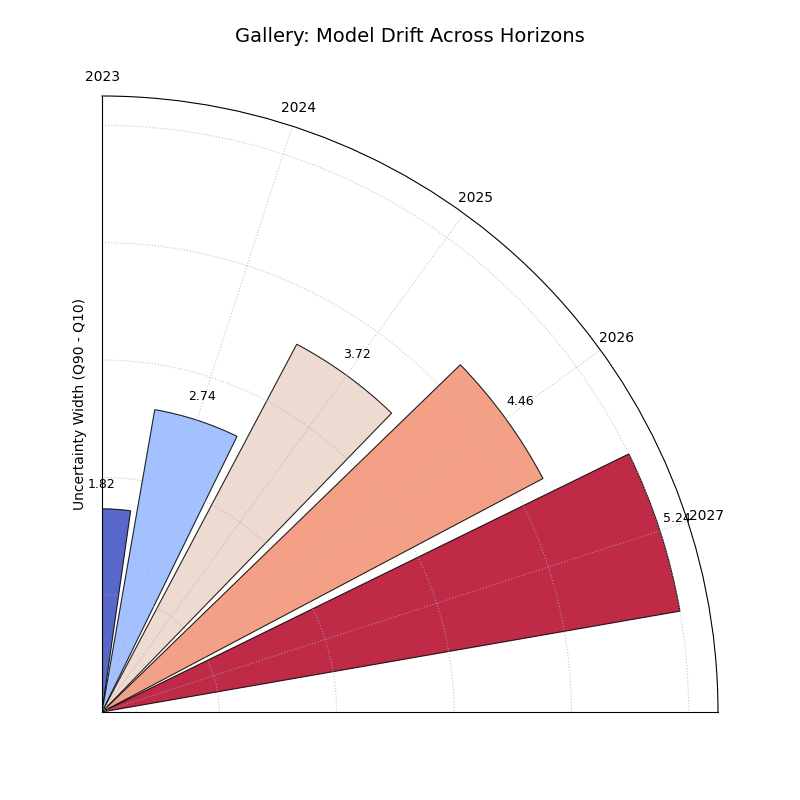
Shows how average uncertainty (mean interval width) evolves across different forecast horizons using a polar bar chart. Helps diagnose model degradation over lead time.
 1import kdiagram as kd
 2import pandas as pd
 3import numpy as np
 4import matplotlib.pyplot as plt
 5
 6# --- Data Generation ---
 7np.random.seed(0)
 8years = [2023, 2024, 2025, 2026, 2027]
 9n_samples = 50
10df = pd.DataFrame()
11q10_cols, q90_cols = [], []
12for i, year in enumerate(years):
13    ql, qu = f'val_{year}_q10', f'val_{year}_q90'
14    q10_cols.append(ql); q90_cols.append(qu)
15    q10 = np.random.rand(n_samples)*5 + i*0.5 # Width tends to increase
16    q90 = q10 + np.random.rand(n_samples)*2 + 1 + i*0.8
17    df[ql]=q10; df[qu]=q90
18
19# --- Plotting ---
20kd.plot_model_drift(
21    df=df,
22    q10_cols=q10_cols,
23    q90_cols=q90_cols,
24    horizons=years, # Label bars with years
25    acov='quarter_circle', # Use 90 degree span
26    title='Gallery: Model Drift Across Horizons',
27    # Save the plot (adjust path relative to docs/source/)
28    savefig="gallery/images/gallery_model_drift.png"
29)
30plt.close()
Temporal Uncertainty
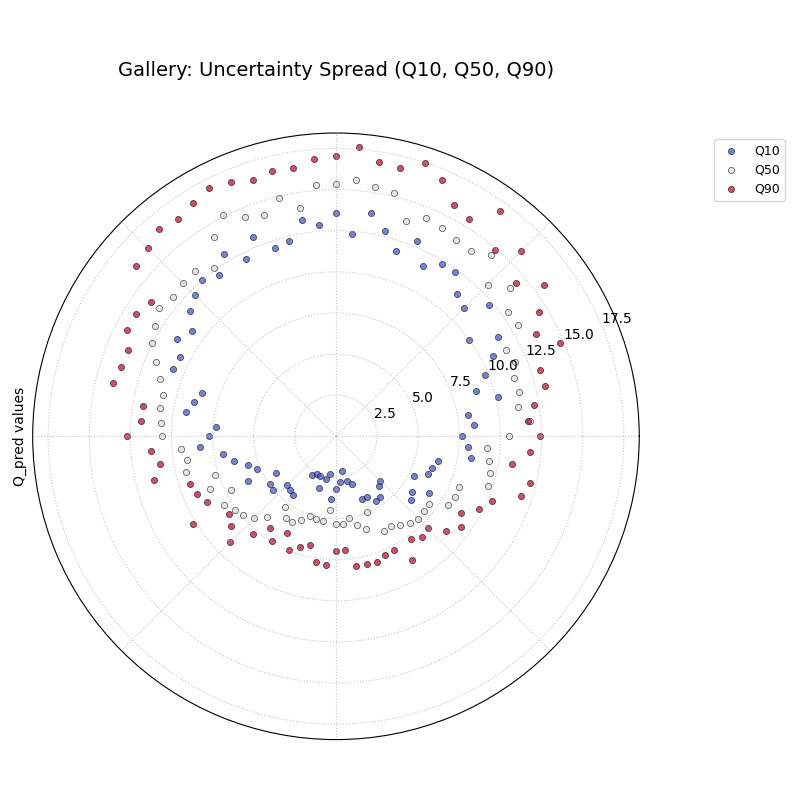
A general polar scatter plot for visualizing multiple data series. Often used to show different quantiles (e.g., Q10, Q50, Q90) for a single time step to illustrate the uncertainty spread across samples.
 1import kdiagram as kd
 2import pandas as pd
 3import numpy as np
 4import matplotlib.pyplot as plt
 5
 6# --- Data Generation ---
 7np.random.seed(99)
 8n_points = 80
 9df = pd.DataFrame({'id': range(n_points)})
10base = 10 + 5*np.sin(np.linspace(0, 2*np.pi, n_points))
11df['val_q10'] = base - np.random.rand(n_points)*2 - 1
12df['val_q50'] = base + np.random.randn(n_points)*0.5
13df['val_q90'] = base + np.random.rand(n_points)*2 + 1
14# Ensure order for clarity in plot
15df['val_q50'] = np.maximum(df['val_q10'] + 0.1, df['val_q50'])
16df['val_q90'] = np.maximum(df['val_q50'] + 0.1, df['val_q90'])
17
18
19# --- Plotting ---
20kd.plot_temporal_uncertainty(
21    df=df,
22    q_cols=['val_q10', 'val_q50', 'val_q90'],
23    names=['Q10', 'Q50', 'Q90'],
24    title='Gallery: Uncertainty Spread (Q10, Q50, Q90)',
25    normalize=False, # Show raw values
26    cmap='coolwarm', # Use diverging map for bounds
27    s=20,
28    mask_angle=True,
29    # Save the plot (adjust path relative to docs/source/)
30    savefig="gallery/images/gallery_temporal_uncertainty_quantiles.png"
31)
32plt.close()
Uncertainty Drift
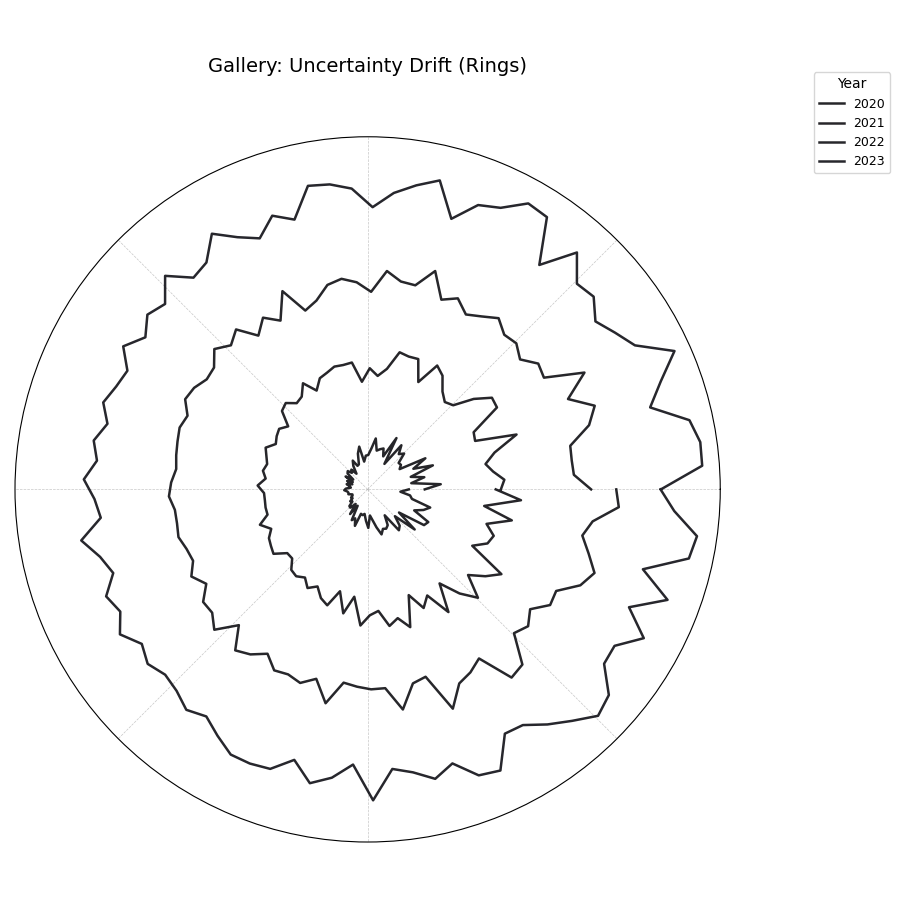
Visualizes how the interval width pattern evolves across multiple time steps using concentric rings. Each ring represents a time step, showing the relative uncertainty width at each angle (location).
 1import kdiagram as kd
 2import pandas as pd
 3import numpy as np
 4import matplotlib.pyplot as plt
 5
 6# --- Data Generation ---
 7np.random.seed(55)
 8n_points = 90; n_years = 4; years = range(2020, 2020 + n_years)
 9df = pd.DataFrame({'id': range(n_points)})
10qlow_cols, qup_cols = [], []
11for i, year in enumerate(years):
12    ql, qu = f'value_{year}_q10', f'value_{year}_q90'
13    qlow_cols.append(ql); qup_cols.append(qu)
14    base_low = np.random.rand(n_points)*3 + i*0.1
15    width = (np.random.rand(n_points)+0.5)*(1.5+i*0.3 + np.cos(
16        np.linspace(0, 2*np.pi, n_points)))
17    df[ql] = base_low; df[qu] = base_low + width
18    df[qu] = np.maximum(df[qu], df[ql]) # Ensure non-negative width
19
20# --- Plotting ---
21kd.plot_uncertainty_drift(
22    df=df,
23    qlow_cols=qlow_cols,
24    qup_cols=qup_cols,
25    dt_labels=[str(y) for y in years],
26    title='Gallery: Uncertainty Drift (Rings)',
27    cmap='magma',
28    base_radius=0.1, band_height=0.1,
29    # Save the plot (adjust path relative to docs/source/)
30    savefig="gallery/images/gallery_uncertainty_drift_rings.png"
31)
32plt.close()
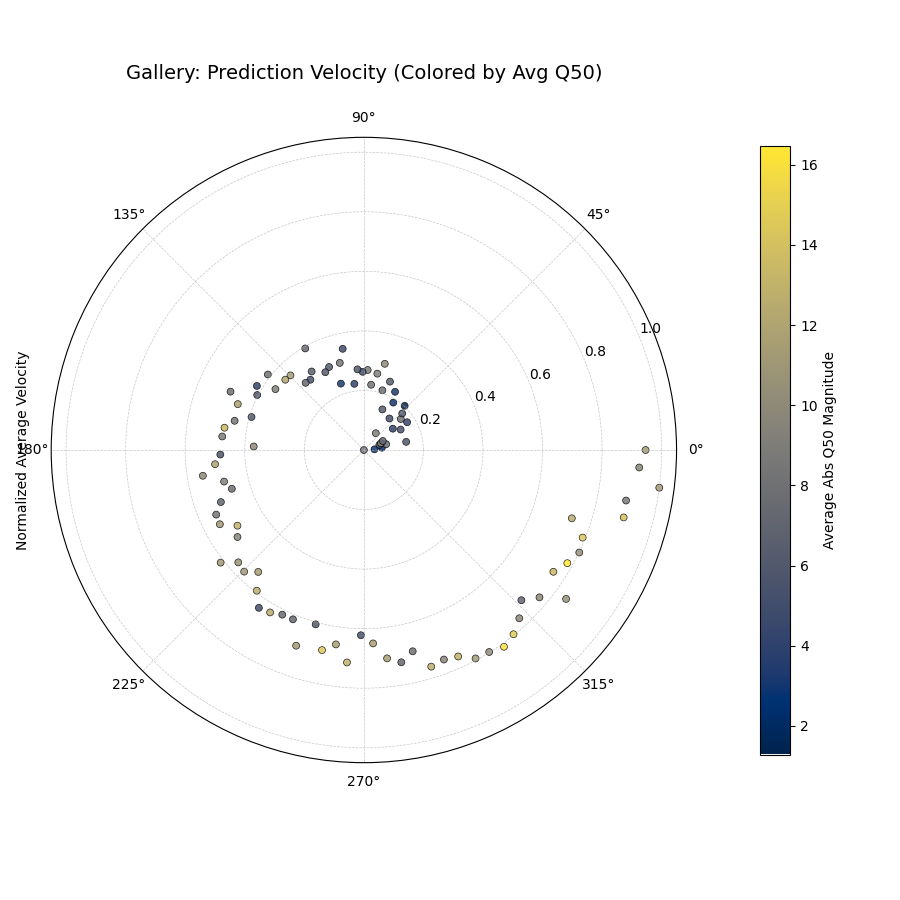
Prediction Velocity
Visualizes the average rate of change (velocity) of the median (Q50) prediction over consecutive time periods for each location. Radius indicates velocity magnitude; color can indicate velocity or average Q50.
 1import kdiagram as kd
 2import pandas as pd
 3import numpy as np
 4import matplotlib.pyplot as plt
 5
 6# --- Data Generation ---
 7np.random.seed(123)
 8n_points = 100; years = range(2020, 2024)
 9df = pd.DataFrame({'location_id': range(n_points)})
10q50_cols = []
11base_val = np.random.rand(n_points)*10
12trend = np.linspace(0, 5, n_points)
13for i, year in enumerate(years):
14    q50_col = f'val_{year}_q50'
15    q50_cols.append(q50_col)
16    noise = np.random.randn(n_points)*0.5
17    df[q50_col] = base_val + trend*i + noise
18
19# --- Plotting ---
20kd.plot_velocity(
21    df=df,
22    q50_cols=q50_cols,
23    title='Gallery: Prediction Velocity (Colored by Avg Q50)',
24    use_abs_color=True, # Color by magnitude of Q50
25    normalize=True,     # Normalize radius (velocity)
26    cmap='cividis',
27    cbar=True,
28    s=25,
29    # Save the plot (adjust path relative to docs/source/)
30    savefig="gallery/images/gallery_velocity_abs_color.png"
31)
32plt.close()