Contents Menu Expand Light mode Dark mode Auto light/dark, in light mode Auto light/dark, in dark mode Skip to content
k-diagram v1.0.3
Logo
k-diagram v1.0.3

Documentation Contents:

  • Installation
  • Quick Start Guide
  • Motivation and Background
  • User Guide
    • Visualizing Forecast Uncertainty
    • Model Evaluation with Taylor Diagrams
    • Model Comparison Visualization
    • Feature Importance Visualization
    • Visualizing Relationships
    • Datasets
    • Utility Functions
    • Case Study: Zhongshan Land Subsidence Uncertainty
  • Command-Line Interface (CLI)
  • Gallery
    • Uncertainty Visualizations
    • Model Evaluation Gallery (Taylor Diagrams)
    • Model Comparison Gallery
    • Feature-Based Visualization Gallery
    • Utility Function Examples
  • API Reference
    • kdiagram.plot.uncertainty.plot_actual_vs_predicted
    • kdiagram.plot.uncertainty.plot_anomaly_magnitude
    • kdiagram.plot.uncertainty.plot_coverage
    • kdiagram.plot.uncertainty.plot_coverage_diagnostic
    • kdiagram.plot.uncertainty.plot_interval_consistency
    • kdiagram.plot.uncertainty.plot_interval_width
    • kdiagram.plot.uncertainty.plot_model_drift
    • kdiagram.plot.uncertainty.plot_temporal_uncertainty
    • kdiagram.plot.uncertainty.plot_uncertainty_drift
    • kdiagram.plot.uncertainty.plot_velocity
    • kdiagram.plot.evaluation.taylor_diagram
    • kdiagram.plot.evaluation.plot_taylor_diagram_in
    • kdiagram.plot.evaluation.plot_taylor_diagram
    • kdiagram.plot.comparison.plot_model_comparison
    • kdiagram.plot.feature_based.plot_feature_fingerprint
    • kdiagram.plot.relationship.plot_relationship
    • kdiagram.utils.build_q_column_names
    • kdiagram.utils.detect_quantiles_in
    • kdiagram.utils.melt_q_data
    • kdiagram.utils.pivot_q_data
    • kdiagram.utils.reshape_quantile_data
  • Contributing
  • Code of Conduct
  • Citing k-diagram
  • Release Notes
  • Glossary
  • License
Back to top
View this page

Model Comparison Gallery

This gallery page showcases plots from k-diagram designed for comparing the performance of multiple models across various metrics, primarily using radar charts.

Note

You need to run the code snippets locally to generate the plot images referenced below (e.g., images/gallery_model_comparison.png). Ensure the image paths in the .. image:: directives match where you save the plots (likely an images subdirectory relative to this file).

Multi-Metric Model Comparison

Uses plot_model_comparison() to generate a radar chart comparing multiple models across several performance metrics (R2, MAE, RMSE, MAPE by default for regression) and includes training time as an additional axis. Scores are normalized for visual comparison.

 1import kdiagram.plot.comparison as kdc
 2import numpy as np
 3import matplotlib.pyplot as plt
 4
 5# --- Data Generation ---
 6np.random.seed(42)
 7rng = np.random.default_rng(42)
 8n_samples = 100
 9y_true_reg = np.random.rand(n_samples) * 20 + 5 # True values
10# Model 1: Good fit
11y_pred_r1 = y_true_reg + np.random.normal(0, 2, n_samples)
12# Model 2: Slight bias, more noise
13y_pred_r2 = y_true_reg * 0.9 + 3 + np.random.normal(0, 3, n_samples)
14# Model 3: Less correlated
15y_pred_r3 = np.random.rand(n_samples) * 25 + rng.normal(0, 4, n_samples)
16
17times = [0.2, 0.8, 0.5] # Example training times
18names = ['Ridge', 'Lasso', 'Tree'] # Example model names
19
20# --- Plotting ---
21ax = kdc.plot_model_comparison(
22    y_true_reg,
23    y_pred_r1,
24    y_pred_r2,
25    y_pred_r3,
26    train_times=times,
27    names=names,
28    # metrics=['r2', 'mae'] # Optionally specify metrics
29    title="Gallery: Multi-Metric Model Comparison (Regression)",
30    scale='norm', # Normalize scores to [0, 1] (higher is better)
31    # Save the plot (adjust path relative to this file)
32    savefig="images/gallery_model_comparison.png"
33)
34plt.close() # Close plot after saving
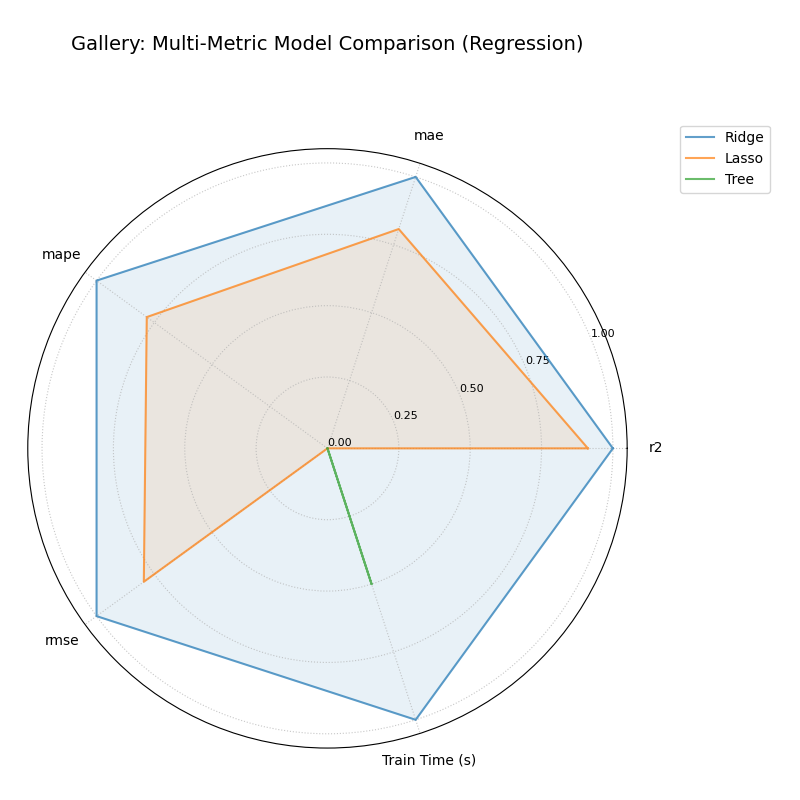
Example Multi-Metric Model Comparison Radar Chart

🧠 Analysis and Interpretation

The Multi-Metric Model Comparison plot uses a radar chart to provide a holistic view of performance across several metrics for multiple models.

Analysis and Interpretation:

  • Axes: Each axis represents a performance metric (e.g., R2, MAE, RMSE, MAPE, Train Time). Note that error metrics like MAE and time are internally inverted during normalization, so a larger radius always indicates better performance on that axis (higher R2, lower MAE, lower time).

  • Polygons: Each colored polygon represents a model.

  • Performance Profile: The shape and size of a model’s polygon reveal its strengths and weaknesses. A large, balanced polygon generally indicates good overall performance. Comparing polygons shows relative performance across all chosen metrics.

🔍 Key Insights from this Example:

  • We can directly compare ‘Ridge’, ‘Lasso’, and ‘Tree’ models.

  • Look at the ‘r2’ axis: the model whose polygon extends furthest has the highest R-squared value.

  • Look at the ‘mae’ axis: the model whose polygon extends furthest here had the lowest MAE (since lower error is better and was inverted during scaling).

  • Look at the ‘Train Time (s)’ axis: the model extending furthest was the fastest to train.

  • By examining the overall shape, we can identify trade-offs (e.g., one model might have the best R2 but be the slowest).

💡 When to Use:

  • Model Selection: When choosing between models based on multiple, potentially conflicting, performance criteria.

  • Performance Summary: To create a concise visual summary of comparative model performance for reports or presentations.

  • Identifying Trade-offs: Clearly visualize if improving one metric comes at the cost of another (e.g., accuracy vs. speed).

Next
Feature-Based Visualization Gallery
Previous
Model Evaluation Gallery (Taylor Diagrams)
Copyright © 2025, Laurent Kouadio
Made with Sphinx and @pradyunsg's Furo
On this page
  • Model Comparison Gallery
    • Multi-Metric Model Comparison