Contents Menu Expand Light mode Dark mode Auto light/dark, in light mode Auto light/dark, in dark mode Skip to content
k-diagram v1.0.3
Logo
k-diagram v1.0.3

Documentation Contents:

  • Installation
  • Quick Start Guide
  • Motivation and Background
  • User Guide
    • Visualizing Forecast Uncertainty
    • Model Evaluation with Taylor Diagrams
    • Model Comparison Visualization
    • Feature Importance Visualization
    • Visualizing Relationships
    • Datasets
    • Utility Functions
    • Case Study: Zhongshan Land Subsidence Uncertainty
  • Command-Line Interface (CLI)
  • Gallery
    • Uncertainty Visualizations
    • Model Evaluation Gallery (Taylor Diagrams)
    • Model Comparison Gallery
    • Feature-Based Visualization Gallery
    • Utility Function Examples
  • API Reference
    • kdiagram.plot.uncertainty.plot_actual_vs_predicted
    • kdiagram.plot.uncertainty.plot_anomaly_magnitude
    • kdiagram.plot.uncertainty.plot_coverage
    • kdiagram.plot.uncertainty.plot_coverage_diagnostic
    • kdiagram.plot.uncertainty.plot_interval_consistency
    • kdiagram.plot.uncertainty.plot_interval_width
    • kdiagram.plot.uncertainty.plot_model_drift
    • kdiagram.plot.uncertainty.plot_temporal_uncertainty
    • kdiagram.plot.uncertainty.plot_uncertainty_drift
    • kdiagram.plot.uncertainty.plot_velocity
    • kdiagram.plot.evaluation.taylor_diagram
    • kdiagram.plot.evaluation.plot_taylor_diagram_in
    • kdiagram.plot.evaluation.plot_taylor_diagram
    • kdiagram.plot.comparison.plot_model_comparison
    • kdiagram.plot.feature_based.plot_feature_fingerprint
    • kdiagram.plot.relationship.plot_relationship
    • kdiagram.utils.build_q_column_names
    • kdiagram.utils.detect_quantiles_in
    • kdiagram.utils.melt_q_data
    • kdiagram.utils.pivot_q_data
    • kdiagram.utils.reshape_quantile_data
  • Contributing
  • Code of Conduct
  • Citing k-diagram
  • Release Notes
  • Glossary
  • License
Back to top
View this page

Feature-Based Visualization Gallery

This gallery page showcases plots from k-diagram focused on understanding feature influence and importance. Currently, it features the Feature Importance Fingerprint plot.

Note

You need to run the code snippets locally to generate the plot images referenced below (e.g., images/gallery_feature_fingerprint.png). Ensure the image paths in the .. image:: directives match where you save the plots (likely an images subdirectory relative to this file).

Feature Importance Fingerprint

Uses plot_feature_fingerprint(). This radar chart compares the importance profiles (“fingerprints”) of several features across different groups or layers (e.g., different years or models). This example shows raw (unnormalized) importance values comparing feature influence across three years.

 1# Assuming plot function is in kd.plot.feature_based
 2import kdiagram.plot.feature_based as kdf
 3import numpy as np
 4import matplotlib.pyplot as plt
 5
 6# --- Data Generation ---
 7features = ['Rainfall', 'Temperature', 'Wind Speed',
 8            'Soil Moisture', 'Solar Radiation', 'Topography']
 9n_features = len(features)
10years = ['2022', '2023', '2024']
11n_layers = len(years)
12
13# Generate importance scores (rows=years, cols=features)
14# Make them slightly different per year
15np.random.seed(123)
16importances = np.random.rand(n_layers, n_features) * 0.5
17importances[0, 0] = 0.8 # Rainfall important in 2022
18importances[1, 3] = 0.9 # Soil Moisture important in 2023
19importances[2, 1] = 0.7 # Temperature important in 2024
20importances[2, 4] = 0.75# Solar Radiation also important in 2024
21
22# --- Plotting ---
23kdf.plot_feature_fingerprint(
24    importances=importances,
25    features=features,
26    labels=years,
27    normalize=False, # Show raw importance scores
28    fill=True,
29    cmap='Pastel1',
30    title="Gallery: Feature Importance Fingerprint (Yearly)",
31    # Save the plot relative to this file's location
32    savefig="images/gallery_feature_fingerprint.png"
33)
34plt.close()
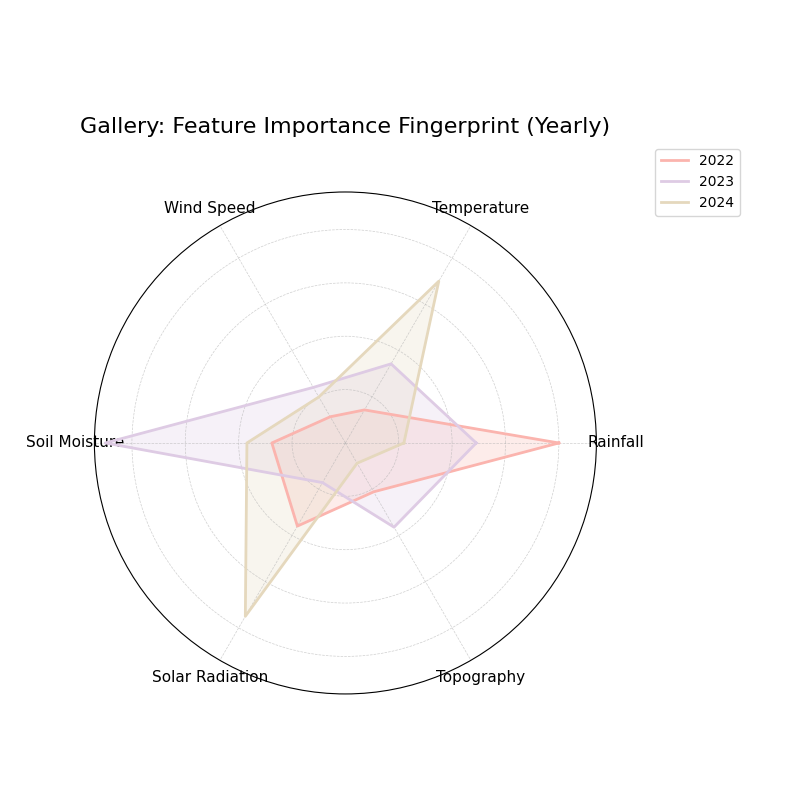
Feature Importance Fingerprint Plot Example

🧠 Analysis and Interpretation

The Feature Importance Fingerprint (a radar plot) visually represents the importance of various features across different groups or “layers”. Each axis corresponds to a feature, and each colored polygon represents a layer (here, different years). The distance from the center along an axis indicates that feature’s importance for that specific layer.

Analysis and Interpretation:

  • Axes: Represent Rainfall, Temperature, Wind Speed, Soil Moisture, Solar Radiation, and Topography.

  • Layers (Colors/Polygons): Represent the years 2022, 2023, and 2024, showing how feature importance changes annually.

  • Radius: Since normalize=False, the radius shows the raw importance score. Larger extensions along an axis mean higher importance.

  • Shape (“Fingerprint”): The overall shape of each polygon gives a unique “fingerprint” of feature influence for that year.

🔍 Key Insights from this Example:

  • 2022: The polygon extends furthest along the Rainfall axis, indicating it was the dominant feature in that year’s model or context.

  • 2023: The Soil Moisture axis shows the largest value, suggesting a shift in primary drivers compared to 2022.

  • 2024: Temperature and Solar Radiation show the highest importance, indicating another change in the factors influencing the outcome for this year.

  • Comparison: We can easily see that the relative importance of features is not static but changes from year to year.

💡 When to Use This Plot:

  • Compare Feature Importance: Visualize differences between models, time periods, or groups (e.g., spatial zones).

  • Identify Dominant Features: Quickly see which features have the most impact for each layer.

  • Analyze Importance Drift: Track how feature influence evolves over time, as shown in this yearly example.

  • Model Interpretation: Understand and communicate the key drivers behind model predictions for different scenarios.

Next
Utility Function Examples
Previous
Model Comparison Gallery
Copyright © 2025, Laurent Kouadio
Made with Sphinx and @pradyunsg's Furo
On this page
  • Feature-Based Visualization Gallery
    • Feature Importance Fingerprint